ServiceNow
Introduction
This guide explains how to authenticate the ServiceNow connector in Swimlane.
The connector supports three authentication methods:
- OAuth 2.0 Client Credentials
- OAuth 2.0 Password Grant
- HTTP Basic Authentication
You will collect the required credentials, configure authentication parameters, and set up the connector inside Swimlane.
Prerequisites
ServiceNow Access Requirements
- Access the ServiceNow REST API
- Retrieve account credentials or API OAuth credentials
- Have roles permitting API usage
Required Credentials
For OAuth 2.0 Client Credentials:
- URL
- Client ID
- Client Secret
- Token URL
- Scope
- For OAuth 2.0 Password Grant:
- URL
- Client ID
- Client Secret
- Username
- Password
- Token URL
For HTTP Basic Authentication:
- URL
- Username
- Password
Authentication Methods Overview
OAuth 2.0 Client Credentials
Used for server-to-server authentication.
You will need:
- Client ID
- Client Secret
- Token URL
- Scope(s)
OAuth 2.0 Password Grant
Used for delegated user authentication.
You will need:
- Client ID
- Client Secret
- Username
- Password
- Token URL
- Scope(s)
HTTP Basic Authentication
Simple username/password authentication.
You will need:
- URL
- Username
- Password
ServiceNow Setup
Take the following steps to prepare ServiceNow credentials:
- Log in to your ServiceNow instance.
- Navigate to System OAuth > Application Registry.
- Create an OAuth API endpoint for external clients if required.
- Copy the Client ID and Client Secret.
- Determine your ServiceNow REST API base URL.
Connector Configuration in Swimlane
- Log in to Turbine.
- From the left-hand navigation pane, click ORCHESTRATION and click Assets. Asset homepage opens.
- Click the plus icon to open the Configure your Connector Asset window.
- Select ServiceNow from the Asset type list.
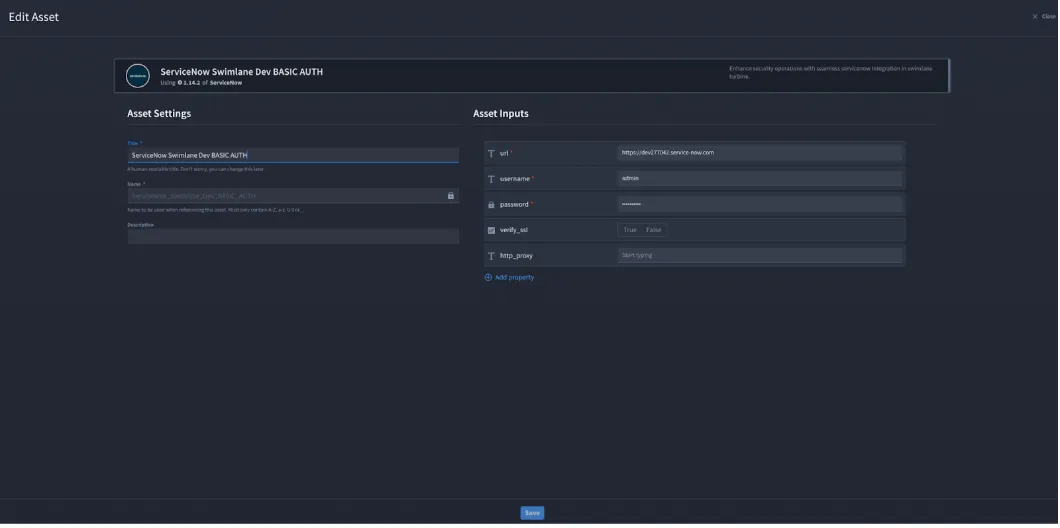
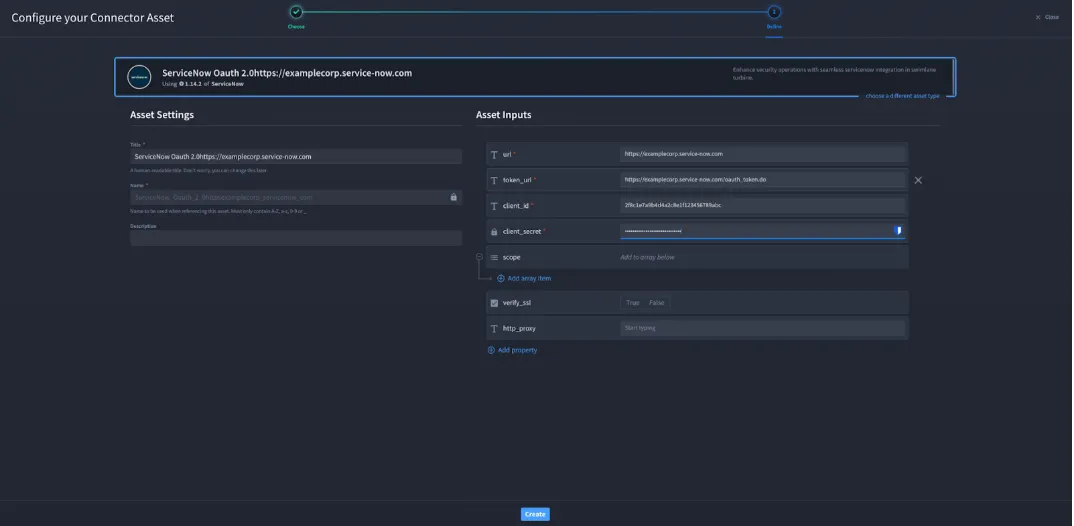
- Fill in the Asset Settings and Asset Input as shown as per your authentication method:
Configuration - HTTP Basic Authentication
Field | Description | Required/Optional |
|---|---|---|
url | A URL to the target host. | Required |
username | Username | Required |
password | Password | Required |
verify_ssl | Verify SSL certificate | Optional |
http_proxy | A proxy to route requests through. | Optional |
Configuration - OAuth 2.0 Client Credentials
Field | Description | Required |
|---|---|---|
url | A URL to the target host. | Required |
token_url | Token URL. | Required |
client_id | Client ID | Required |
client_secret | Client Secret | Required |
scope | Permission scopes | Optional |
verify_ssl | Verify SSL certificate | Optional |
http_proxy | A proxy to route requests through. | Optional |
Configuration – OAuth 2.0 Password Grant
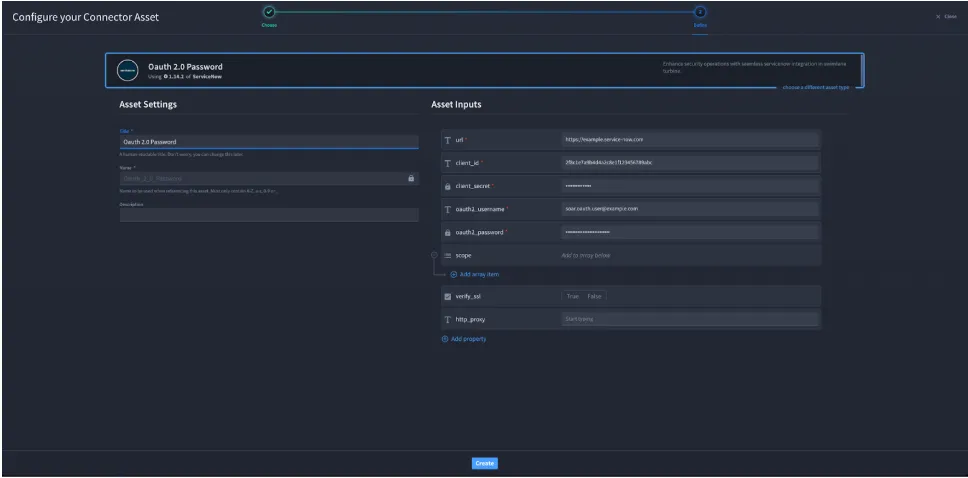
Field | Description | Required/Optional |
|---|---|---|
url | A URL to the target host. | Required |
client_id | Client ID | Required |
client_secret | Client Secret | Required |
scope | Permission scopes | Optional |
oauth2_username | Username | Required |
oauth2_password | Password | Required |
verify_ssl | Verify SSL certificate | Optional |
http_proxy | A proxy to route requests through. | Optional |
- Click Create.
Troubleshooting
If you encounter authentication issues with the ServiceNow connector, review the following common causes and resolutions:
- Incorrect URL Ensure the ServiceNow REST API base URL is correct for your instance. Example formats: https://<instance>.service-now.com/api/...
- Invalid OAuth credentials Verify that the Client ID and Client Secret match the values generated in ServiceNow → System OAuth → Application Registry.
- Insufficient permissions Confirm that the authenticated user or OAuth application has the required roles and access to use the ServiceNow REST API.
- SSL verification errors If SSL inspection or certificate rewriting is used in your environment, set verify_ssl to false or update certificates accordingly.
- Proxy configuration issues If your environment uses a proxy, ensure the http_proxy value is correctly formatted and that the proxy allows outbound connections to ServiceNow.
You have successfully authenticated the ServiceNow connector using one of the supported authentication methods.