OpenCTI Threat Intel Enrichment
Introduction
This guide tells you how to authenticate the OpenCTI Threat Intel Enrichment connector in Swimlane using an API Key.
You will generate an OpenCTI API Key, collect the required endpoint URL, and configure the connector in Swimlane.
Prerequisites
OpenCTI Access Requirements
You must have:
- Access to an OpenCTI instance.
- Permission to generate and use API keys.
- Access to the OpenCTI GraphQL API.
Required Credentials
During setup, you will collect:
- API URL
- API Key
OpenCTI Setup
Take the following steps to generate an API Key:
- Log in to your OpenCTI instance.
- Click your User Profile in the upper-right corner.
- Select Settings (or Profile, depending on your OpenCTI version).
- Locate the API Token or Personal Access Token section.
- Click Generate Token (or Regenerate Token if one already exists).
- Copy and securely save the generated API Key. This value will be used in Swimlane.
The API key is displayed only when it is generated. Store it securely before leaving the page.
Take the following steps to identify the API URL:
The API URL is the URL of your OpenCTI instance.
Examples:
- https://opencti.company.com
- https://opencti.example.com
Use your organization's OpenCTI server URL as the url value in Swimlane.
Connector configuration in Swimlane
- Log in to Turbine.
- From the left-hand navigation pane, click ORCHESTRATION and click Assets.
- Asset homepage opens.
- Click the plus icon to open the Configure your Connector Asset window.
- Select OpenCTI Threat Intel Enrichment from the Asset type list.
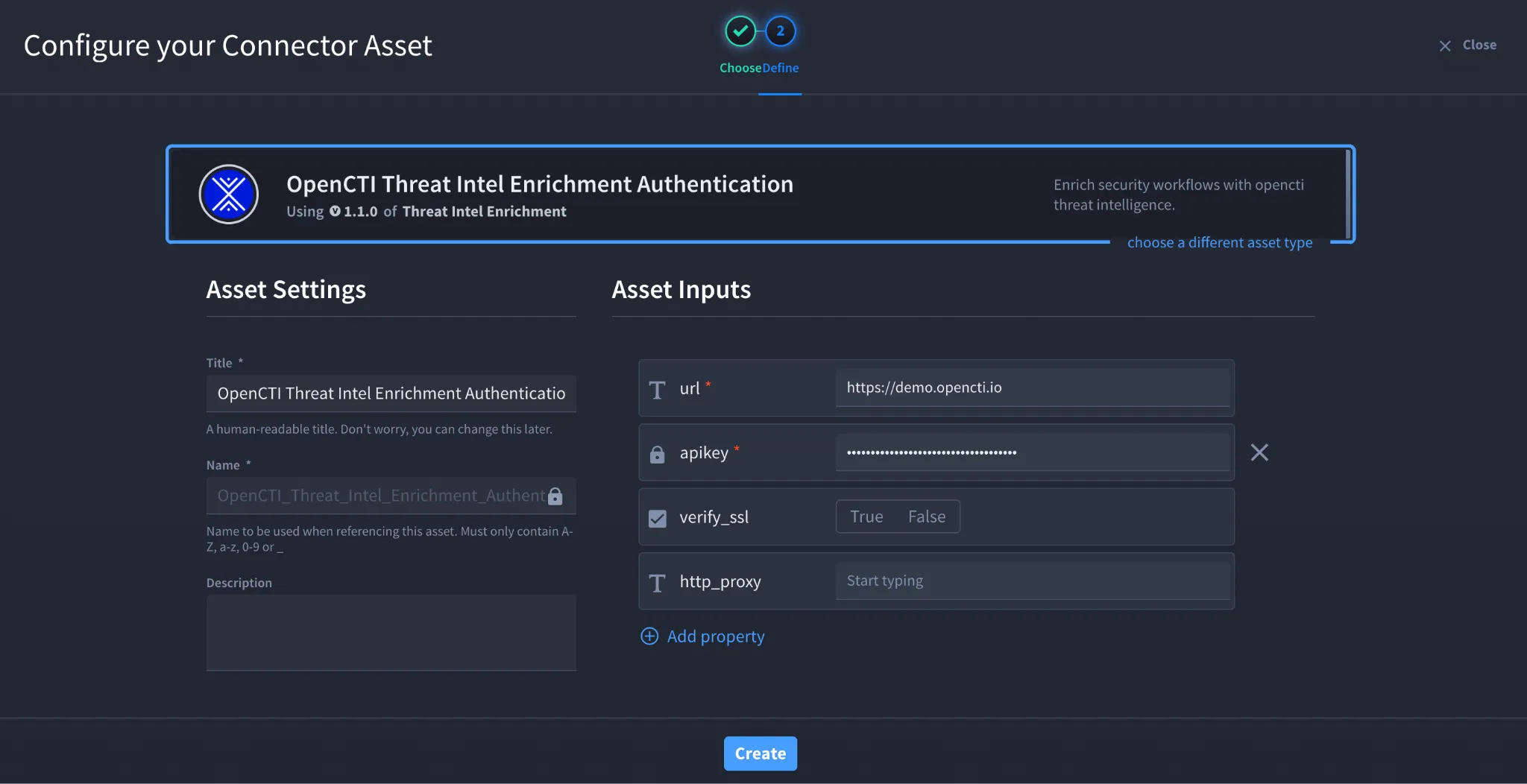
- Fill in the Asset Settings and Asset Input as shown:
Field | Description | Required/Optional |
|---|---|---|
url | OpenCTI instance URL | Required |
apikey | OpenCTI API Key | Required |
verify_ssl | Enable/Disable SSL Verification | Optional |
http_proxy | Optional proxy configuration | Optional |
Fields with * marks are required.
- Click Create.
Troubleshooting
If authentication fails:
- Verify that the API key is valid and has not been revoked.
- Ensure the URL points to your OpenCTI instance.
- Confirm that the account associated with the API key has permission to access the required OpenCTI APIs.
- Verify that HTTPS access to the OpenCTI server is not blocked by a firewall or proxy.
- If using a self-signed certificate, disable verify_ssl only if permitted by your organization's security policy.
Result
You have successfully authenticated the OpenCTI Threat Intel Enrichment connector in Swimlane.
Sources
- OpenCTI Documentation: https://docs.opencti.io/
- OpenCTI API Documentation: https://docs.opencti.io/latest/reference/api/
- OpenCTI Authentication Documentation: https://docs.opencti.io/latest/deployment/security/