Amazon AWS Security Hub
Introduction
This guide tells you how to authenticate the Amazon AWS Security Hub connector in Swimlane using AWS Credentials.
You will create an IAM user or IAM role with the required Security Hub permissions, collect the required AWS credentials, and configure the connector in Swimlane.
Prerequisites
AWS Access Requirements
You must have permissions to:
- Access the AWS Management Console.
- Create and manage IAM users or IAM roles.
- Generate Access Keys.
- View AWS Security Hub findings and insights.
- Assume IAM roles (if using Role ARN authentication).
Required Credentials
During setup, you will collect:
- AWS Access Key ID
- AWS Secret Access Key
- AWS Region
- IAM Role ARN
AWS Setup
Take the following steps to create an IAM User:
- Sign in to the AWS Management Console.
- Navigate to IAM.
- Select Users.
- Click Create user.
- Enter a user name.
- Click Next.
- Under Permissions, attach a policy that grants access to AWS Security Hub.
- Complete the user creation wizard.
Take the following steps to create an Access Key:
- Open the newly created IAM user.
- Select the Security credentials tab.
- Scroll to Access keys.
- Click Create access key.
- Select the appropriate use case.
- Click Create access key.
- Copy and securely save:
- Access Key ID
- Secret Access Key
These values are required when configuring the Swimlane connector.
Take the following steps to create an IAM Role (Optional but Recommended)
- Navigate to IAM > Roles.
- Click Create role.
- Select the trusted entity according to your environment.
- Attach a policy that grants access to AWS Security Hub.
- Enter a role name.
- Click Create role.
- Open the role and copy the Role ARN.
Example:
arn:aws:iam::123456789012:role/SwimlaneSecurityHubRole
Take the following steps to determine the AWS Region
- Sign in to the AWS Management Console.
- Select the region from the region selector in the upper-right corner.
Examples include:
- us-east-1
- us-west-2
- eu-west-1
- ap-southeast-2
Use the region where AWS Security Hub is enabled.
Required IAM Permissions
The IAM user or IAM role should have permission to perform Security Hub operations.
Typical permissions include:
- securityhub:GetFindings
- securityhub:GetInsights
- securityhub:BatchGet*
- securityhub:Describe*
If using an IAM Role, the IAM user must also have:
- sts:AssumeRole
Grant only the permissions required by your organization.
Connector Configuration in Swimlane
- Log in to Turbine.
- From the left-hand navigation pane, click ORCHESTRATION and click Assets.
- Asset homepage opens.
- Click the plus icon to open the Configure your Connector Asset window.
- Select Amazon AWS Security Hub from the Asset type list.
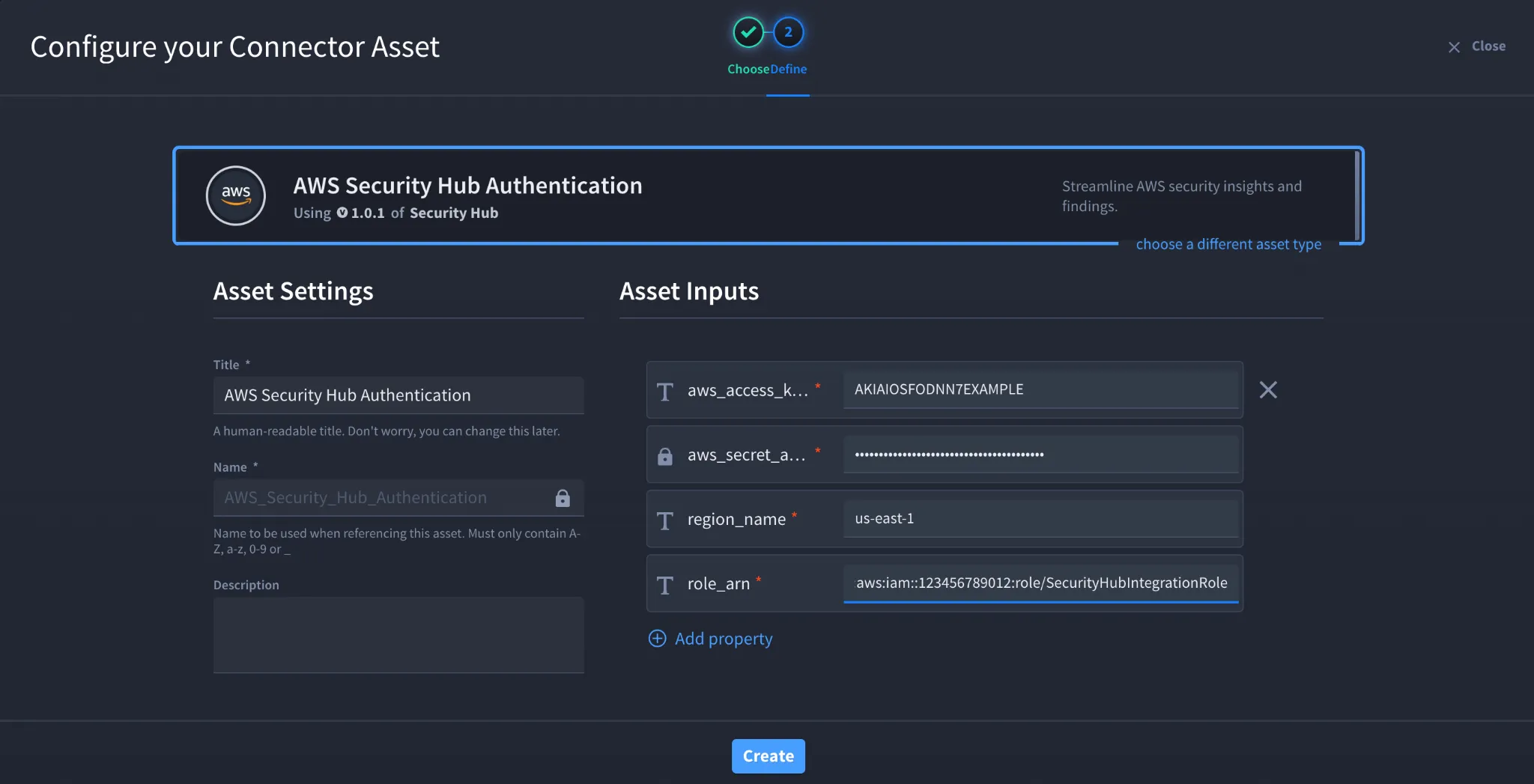
- Fill in the Asset Settings and Asset Input as shown:
Field | Description | Required/Optional |
|---|---|---|
aws_access_key_id | AWS Access Key ID | Required |
aws_secret_access_key | AWS Secret Access Key | Required |
region_name | AWS Region where Security Hub is enabled | Required |
role_arn | IAM Role ARN | Required |
verify_ssl | Enable/Disable SSL Verification | Optional |
http_proxy | Optional proxy configuration | Optional |
Fields with * marks are required.
- Click Create.
Troubleshooting
Authentication Failed
Verify that:
- The Access Key ID is correct.
- The Secret Access Key is correct.
- The access keys are active.
Access Denied
Verify that:
- The IAM user or role has permission to access AWS Security Hub.
- The IAM policy includes the required Security Hub actions.
- The IAM user can assume the specified IAM role.
Unable to Assume Role
Verify that:
- The Role ARN is correct.
- The IAM role trust policy allows your IAM user or application to assume the role.
- The IAM user has the sts:AssumeRole permission.
No Findings Returned
Verify that:
- Security Hub is enabled in the selected AWS Region.
- Findings exist in the selected region.
- The configured IAM credentials have permission to view findings.
SSL Errors
If SSL verification fails:
- Verify that the AWS endpoint uses a trusted SSL certificate.
- Confirm that any proxy is not intercepting SSL traffic.
- Disable verify_ssl only for testing if permitted by your organization's security policy.
Result
You have successfully authenticated the Amazon AWS Security Hub connector in Swimlane.
Sources
- AWS Security Hub User Guide https://docs.aws.amazon.com/securityhub/latest/userguide/what-is-securityhub.html
- AWS Security Hub API Reference https://docs.aws.amazon.com/securityhub/latest/APIReference/Welcome.html
- AWS IAM User Guide – Creating IAM Users https://docs.aws.amazon.com/IAM/latest/UserGuide/id_users_create.html
- AWS IAM User Guide – Managing Access Keys https://docs.aws.amazon.com/IAM/latest/UserGuide/id_credentials_access-keys.html
- AWS IAM Roles Documentation https://docs.aws.amazon.com/IAM/latest/UserGuide/id_roles.html