How to Clean Up Turbine Playbook Runs Data when the Openebs directory is filled up
- Playbook run GridFS files and chunks
- Input/output GridFS files and chunks
Cleanup scripts (attached below)
Run the scripts in the following order:
- PlaybookRunsCleanup.js
- PlaybookRunsJobsCleanup.js
- PlaybookRunsFilesChunksCleanup.js
- InputOutputDataFilesCleanup.js
Do not change the execution order.
1. Preparation and safety checks
1.1 Schedule a maintenance window
The deletion and compaction operations can generate significant MongoDB load, disk I/O, and replication traffic.
Perform this activity during a maintenance window.
Before proceeding:
- Avoid running a platform snapshot or MongoDB backup at the same time.
- Confirm that all MongoDB replicas are healthy.
- Confirm that sufficient free disk space is available.
- Take a supported backup before deleting production data.
- Ensure the cleanup scripts are available on the machine from which kubectl is being run.
1.2 Set the namespace
export NS=default1.3 Check MongoDB replica health
kubectl -n "$NS" get pods | grep mongoAll MongoDB pods should be in the Running state and show all containers as ready.
Example:
mongo-0    2/2    Running
mongo-1    2/2    Running
mongo-2    2/2    Running
2. Identify the MongoDB primary
Run the following command:
export NS=default && kubectl -n $NS exec mongo-0 -- mongosh -quiet -u Admin -p $(kubectl -n $NS get secret mongo-admin -o jsonpath="{.data.password}" | base64 --decode) --authenticationDatabase admin --tls --tlsAllowInvalidHostnames --tlsAllowInvalidCertificates admin --eval="rs.isMaster();" | grep primaryExample output:
Defaulted container "mongo" out of: mongo, copy-config (init), install (init), bootstrap (init)
  primary: 'mongo-0.mongo.default.svc.cluster.local:27017',
In this example, the primary replica is:
mongo-0You can also check the complete replica-set status:
export NS=default && kubectl -n "$NS" exec mongo-0 -- mongosh -quiet -u Admin -p "$(kubectl -n "$NS" get secret mongo-admin -o jsonpath='{.data.password}' | base64 --decode)" --authenticationDatabase admin --tls --tlsAllowInvalidHostnames --tlsAllowInvalidCertificates admin --quiet --eval='rs.status().members.forEach(function(m) { print(m.name + " : " + m.stateStr) })'Expected output will be similar to:
mongo-0.mongo.default.svc.cluster.local:27017 : PRIMARY
mongo-1.mongo.default.svc.cluster.local:27017 : SECONDARY
mongo-2.mongo.default.svc.cluster.local:27017 : SECONDARY
Record which pod is the primary and which pods are secondaries.
3. Connect to the MongoDB primary
Replace mongo-0 with the primary pod identified in the previous step:
export NS=default && kubectl -n $NS exec -it mongo-0 -- mongosh -u Admin -p $(kubectl -n $NS get secret mongo-admin -o jsonpath="{.data.password}" | base64 --decode) --authenticationDatabase admin --ssl --sslAllowInvalidHostnames --sslAllowInvalidCertificates Swimlane4. Identify the large Turbine database
Inside mongosh, run:
show dbsReview the size of each database.
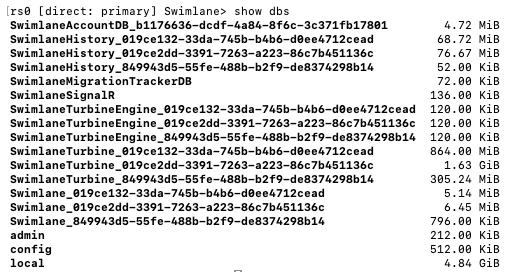
The relevant tenant databases usually have names similar to:
SwimlaneTurbine_XXXXXXXX-XXXX-XXXX-XXXX-XXXXXXXXXXXXSelect the database that is consuming significant storage:
use SwimlaneTurbine_XXXXXXXX-XXXX-XXXX-XXXX-XXXXXXXXXXXX5. Review collection sizes
Run the following function inside the selected database:
function getReadableFileSizeString(fileSizeInBytes) {

    var i = -1;
    var byteUnits = [' kB', ' MB', ' GB', ' TB', 'PB', 'EB', 'ZB', 'YB'];
    do {
        fileSizeInBytes = fileSizeInBytes / 1024;
        i++;
    } while (fileSizeInBytes > 1024);

    return Math.max(fileSizeInBytes, 0.1).toFixed(1) + byteUnits[i];
};
var collectionNames = db.getCollectionNames(), stats = [];
collectionNames.forEach(function (n) { stats.push(db.getCollection(n).stats()); });
stats = stats.sort(function(a, b) { return b['size'] - a['size']; });
for (var c in stats) { print(stats[c]['ns'] + ": " + getReadableFileSizeString(stats[c]['size']) + " (" + getReadableFileSizeString(stats[c]['storageSize']) + ")"); }
The first value represents the logical document size. The value in parentheses represents the allocated collection storage.
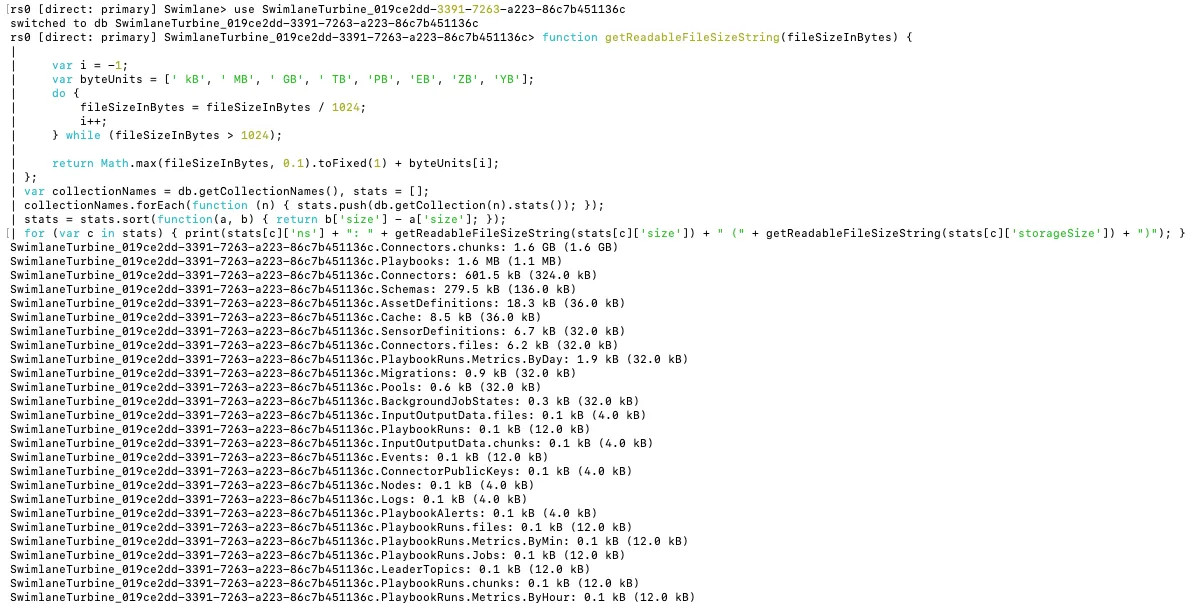
Pay particular attention to:
PlaybookRuns
PlaybookRuns.Jobs
PlaybookRuns.files
PlaybookRuns.chunks
InputOutputData.files
InputOutputData.chunks
Save the output so it can be compared after cleanup and compaction.
Exit mongosh when finished:
exit6. Configure the retention period
Extract the cleanup package:
unzip CleanupScripts2.zip -d CleanupScripts2
cd CleanupScripts2
The four required files are:
PlaybookRunsCleanup.js
PlaybookRunsJobsCleanup.js
PlaybookRunsFilesChunksCleanup.js
InputOutputDataFilesCleanup.js
6.1 Edit PlaybookRunsCleanup.js
Open the file:
vi PlaybookRunsCleanup.jsChange:
const daysToKeep = 1;For example, to retain the most recent 30 days:
const daysToKeep = 30;The script deletes PlaybookRuns documents whose created value is older than the calculated threshold.
6.2 Edit PlaybookRunsJobsCleanup.js
Open the file:
vi PlaybookRunsJobsCleanup.jsChange:
const daysToKeep = 30;Set it to the same retention period:
const daysToKeep = 30;This script deletes PlaybookRuns.Jobs documents whose start value is older than the threshold.
6.3 Edit PlaybookRunsFilesChunksCleanup.js
Open the file:
vi PlaybookRunsFilesChunksCleanup.jsChange:
const DAYS_TO_KEEP = 30;Set the required retention:
const DAYS_TO_KEEP = 30;This script deletes historical files from:
PlaybookRuns.filesIt also deletes their related chunks from:
PlaybookRuns.chunks6.4 Edit InputOutputDataFilesCleanup.js
Open the file:
vi InputOutputDataFilesCleanup.jsChange:
const DAYS_TO_KEEP = 30;Set it to the required retention period:
const DAYS_TO_KEEP = 30;This script deletes historical orphaned input/output files and associated chunks.
Critical scope warning
The supplied scripts contain logic similar to:
dbName.startsWith("SwimlaneTurbine_")Therefore, they will process all databases beginning with SwimlaneTurbine_, not only the database specified at the end of the mongosh command.
Before execution, confirm that the selected retention period is appropriate for every SwimlaneTurbine_ database in the cluster.
NOTE: Do not run the supplied scripts unchanged when only one tenant database should be cleaned.
7. Confirm the deletion threshold
For example, when retaining 30 days, preview the threshold using:
date -u -d '30 days ago'Before running the scripts, the number of records eligible for deletion can be reviewed from mongosh.
Connect to the primary and select the target database:
use SwimlaneTurbine_XXXXXXXX-XXXX-XXXX-XXXX-XXXXXXXXXXXXCount old playbook runs:
db.PlaybookRuns.find( {"start" : { $lte: ISODate('2026-07-29T00:00Z')}} ).count();Count old playbook jobs:
db.PlaybookRuns.Jobs.find( {"start" : { $lte: ISODate('2026-07-29T00:00Z')}} ).count();These are validation counts only. They do not delete data.
8. Run the cleanup scripts
Confirm the MongoDB primary immediately before running the scripts because the primary may have changed.
export NS=default && kubectl -n $NS exec mongo-0 -- mongosh -u Admin -p $(kubectl -n $NS get secret mongo-admin -o jsonpath="{.data.password}" | base64 --decode) --authenticationDatabase admin --ssl --sslAllowInvalidHostnames --sslAllowInvalidCertificates admin --eval="rs.isMaster();" | grep primary8.1 Run PlaybookRunsCleanup.js
kubectl exec -it <PRIMARY_MONGO> -- mongosh -u Admin -p $(kubectl get secret mongo-admin -o jsonpath="{.data.password}" | base64 --decode) --authenticationDatabase admin --ssl --sslAllowInvalidHostnames --sslAllowInvalidCertificates SwimlaneTurbine_XXXXXXXX-XXXX-XXXX-XXXX-XXXXXXXXXXXX < PlaybookRunsCleanup.jsMonitor the output for messages similar to:
Processing database: SwimlaneTurbine_...
Removing Runs older than ...
Runs deletion: ...
Do not proceed until the script finishes.
8.2 Run PlaybookRunsJobsCleanup.js
kubectl exec -it <PRIMARY_MONGO> -- mongosh -u Admin -p $(kubectl get secret mongo-admin -o jsonpath="{.data.password}" | base64 --decode) --authenticationDatabase admin --ssl --sslAllowInvalidHostnames --sslAllowInvalidCertificates SwimlaneTurbine_XXXXXXXX-XXXX-XXXX-XXXX-XXXXXXXXXXXX < PlaybookRunsJobsCleanup.jsMonitor for:
Processing database: SwimlaneTurbine_...
Removing Jobs older than ...
Jobs deletion: ...
8.3 Run PlaybookRunsFilesChunksCleanup.js
kubectl exec -it <PRIMARY_MONGO> -- mongosh -u Admin -p $(kubectl get secret mongo-admin -o jsonpath="{.data.password}" | base64 --decode) --authenticationDatabase admin --ssl --sslAllowInvalidHostnames --sslAllowInvalidCertificates SwimlaneTurbine_XXXXXXXX-XXXX-XXXX-XXXX-XXXXXXXXXXXX < PlaybookRunsFilesChunksCleanup.jsMonitor for:
Deleted ... files and associated chunks.
Processed ... files.
8.4 Run InputOutputDataFilesCleanup.js
kubectl exec -it <PRIMARY_MONGO> -- mongosh -u Admin -p $(kubectl get secret mongo-admin -o jsonpath="{.data.password}" | base64 --decode) --authenticationDatabase admin --ssl --sslAllowInvalidHostnames --sslAllowInvalidCertificates SwimlaneTurbine_XXXXXXXX-XXXX-XXXX-XXXX-XXXXXXXXXXXX < InputOutputDataFilesCleanup.jsMonitor for:
Deleted ... files and associated chunks.
Processed ... files.
9. Verify cleanup completion
Reconnect to the MongoDB primary:
export NS=default && kubectl -n $NS exec mongo-0 -- mongosh -u Admin -p $(kubectl -n $NS get secret mongo-admin -o jsonpath="{.data.password}" | base64 --decode) --authenticationDatabase admin --ssl --sslAllowInvalidHostnames --sslAllowInvalidCertificates admin --eval="rs.isMaster();" | grep primaryInside mongosh, run:
show dbs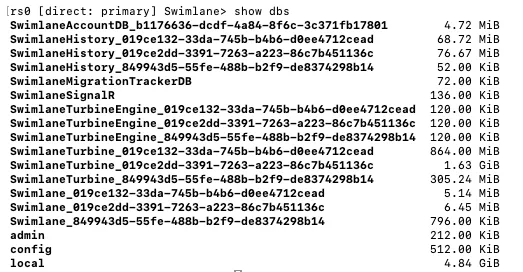
Review the size of each database.
The relevant tenant databases usually have names similar to:
SwimlaneTurbine_XXXXXXXX-XXXX-XXXX-XXXX-XXXXXXXXXXXXSelect the database again
use SwimlaneTurbine_XXXXXXXX-XXXX-XXXX-XXXX-XXXXXXXXXXXXRun the following function inside the selected database:
function getReadableFileSizeString(fileSizeInBytes) {

    var i = -1;
    var byteUnits = [' kB', ' MB', ' GB', ' TB', 'PB', 'EB', 'ZB', 'YB'];
    do {
        fileSizeInBytes = fileSizeInBytes / 1024;
        i++;
    } while (fileSizeInBytes > 1024);

    return Math.max(fileSizeInBytes, 0.1).toFixed(1) + byteUnits[i];
};
var collectionNames = db.getCollectionNames(), stats = [];
collectionNames.forEach(function (n) { stats.push(db.getCollection(n).stats()); });
stats = stats.sort(function(a, b) { return b['size'] - a['size']; });
for (var c in stats) { print(stats[c]['ns'] + ": " + getReadableFileSizeString(stats[c]['size']) + " (" + getReadableFileSizeString(stats[c]['storageSize']) + ")"); }
You may see the relevant DB has been reduced in size.
10. Understand deletion versus disk reclamation
Deleting MongoDB documents does not normally reduce the operating-system size of the MongoDB data files immediately.
After deletion:
- The removed space becomes reusable by MongoDB.
- Filesystem usage may not decrease until collection compaction is performed.
- Compaction is separate from deletion.
Run compaction only after all four cleanup scripts have completed successfully and replica health is normal.
11. Compact affected collections
Important compaction considerations
- Perform compaction during a maintenance window.
- Run it on only one MongoDB member at a time.
- Start with a secondary.
- Wait for that member to recover fully before proceeding.
- Do not compact multiple members simultaneously.
- Continuously monitor replication health and disk availability.
- Reconfirm primary and secondary roles before every node.
- Do not assume that mongo-0, mongo-1, or mongo-2 will retain the same role throughout the activity.
Affected collections:
PlaybookRuns
PlaybookRuns.Jobs
PlaybookRuns.files
PlaybookRuns.chunks
InputOutputData.files
InputOutputData.chunks
11.1 List the current replica roles
export NS=default && kubectl -n "$NS" exec mongo-0 -- mongosh -u Admin -p "$(kubectl -n "$NS" get secret mongo-admin -o jsonpath='{.data.password}' | base64 --decode)" --authenticationDatabase admin --ssl --sslAllowInvalidHostnames --sslAllowInvalidCertificates admin --quiet --eval='rs.status().members.forEach(function(m) { print(m.name + " : " + m.stateStr) })'Identify the two secondary pods.
Example:
mongo-0.mongo.default.svc.cluster.local:27017 : PRIMARY
mongo-1.mongo.default.svc.cluster.local:27017 : SECONDARY
mongo-2.mongo.default.svc.cluster.local:27017 : SECONDARY
11.2 Connect directly to the first secondary
Example:
export SECONDARY_1=mongo-1 && kubectl -n "$NS" exec -it "$SECONDARY_1" -- mongosh -u Admin -p "$(kubectl -n "$NS" get secret mongo-admin -o jsonpath='{.data.password}' | base64 --decode)" --authenticationDatabase admin --ssl --sslAllowInvalidHostnames --sslAllowInvalidCertificates SwimlaneTurbine_XXXXXXXX-XXXX-XXXX-XXXX-XXXXXXXXXXXX11.3 Run the compaction commands
Run each command individually and wait for the response before proceeding:
db.runCommand({
    compact: "PlaybookRuns",
    force: true
});
db.runCommand({
compact: "PlaybookRuns.Jobs",
force: true
});db.runCommand({
compact: "PlaybookRuns.files",
force: true
});db.runCommand({
compact: "PlaybookRuns.chunks",
force: true
});db.runCommand({
compact: "InputOutputData.files",
force: true
});db.runCommand({
compact: "InputOutputData.chunks",
force: true
});A successful result should include:
{
  bytesFreed: Long('66464616448'),
  ok: 1,
  '$clusterTime': {
    clusterTime: Timestamp({ t: 1779114197, i: 27 }),
    signature: {
      hash: Binary.createFromBase64('edoM6vmsYg3xGHODXlClcWzfkWY=', 0),
      keyId: Long('7588083953530044420')
    }
  },
  operationTime: Timestamp({ t: 1779114197, i: 27 })
}
Exit:
exit11.4 Compact the second secondary
Repeat the same process against the second secondary as above.
11.5 Compact the current primary
Only proceed after both secondaries are healthy.
Recheck the current primary:
export NS=default && kubectl -n $NS exec mongo-0 -- mongosh -u Admin -p $(kubectl -n $NS get secret mongo-admin -o jsonpath="{.data.password}" | base64 --decode) --authenticationDatabase admin --ssl --sslAllowInvalidHostnames --sslAllowInvalidCertificates admin --eval="rs.isMaster();" | grep primary12. Post-cleanup validation
12.1 Verify MongoDB replica health
export NS=default && kubectl -n "$NS" exec mongo-0 -- mongosh -u Admin -p "$(kubectl -n "$NS" get secret mongo-admin -o jsonpath='{.data.password}' | base64 --decode)" --authenticationDatabase admin --ssl --sslAllowInvalidHostnames --sslAllowInvalidCertificates admin --quiet --eval='rs.status().members.forEach(function(m) { print(m.name + " | " + m.stateStr + " | health=" + m.health) })'
Expected:
- One PRIMARY
- Remaining members SECONDARY
- health=1 for all members
12.2 Verify MongoDB pod status
export NS=default && kubectl -n "$NS" get pods | grep mongo12.3 Check filesystem space
Run on each Kubernetes node:
df -h | head -20If MongoDB data is under /var/openebs, also check:
du -sh /var/openebs/*The exact host-level reduction depends on MongoDB storage behavior, storage engine allocation, and whether compaction completed successfully.
12.4 Review the collection sizes again
Reconnect to the database and rerun the collection-size function from Step 5.
Compare:
- Document count
- Logical collection size
- Storage size
- Filesystem usage
12.5 Resume activity gradually
After confirming that:
- MongoDB replication is healthy
- MongoDB pods are stable
- No unexpected database errors are present
- Disk utilization is acceptable
Resume paused playbooks and scheduled operations.
Avoid starting a large snapshot immediately while MongoDB is still stabilizing after compaction.
13. Rollback and stop conditions
Stop the procedure and investigate before continuing if any of the following occurs:
- No MongoDB primary is available.
- A secondary enters RECOVERING, ROLLBACK, UNKNOWN, or DOWN.
- Replication lag continues to increase.
- Available disk space becomes critically low.
- A cleanup script exits unexpectedly.
- A compact command returns ok: 0.
- MongoDB pods restart or become unready.
- Application errors increase significantly.
Deleted documents cannot be restored without a valid backup.
Do not manually delete MongoDB files from the underlying filesystem.
14. Recommended execution record
Record the following for the change ticket:
- Maintenance start and end times
- MongoDB primary before cleanup
- Selected retention period
- Databases processed
- Counts before cleanup
- Counts after cleanup
- Script start and completion times
- Output from each cleanup script
- Replica health before and after compaction
- Collection sizes before and after compaction
- Filesystem utilization before and after compaction
- Any errors or warnings encountered