Configure the Turbine Platform for an Embedded Cluster Install
When you need to access the TPI UI after the initial install you can access it by accessing port 8800 over HTTPS on any node IP (for example, https://<NODE_IP>:8800).
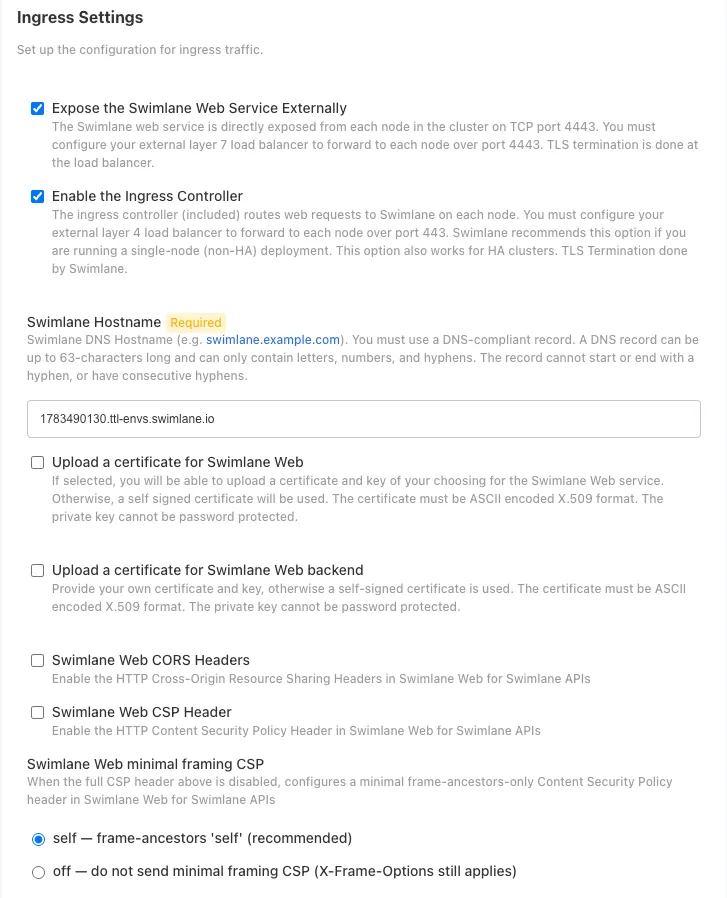
Ingress Settings
- Configure ingress traffic settings for your Turbine deployment. Review and set the following fields as necessary:
- Expose the Swimlane Web Service Externally - Enable this option when using a Layer 7 load balancer (application layer load balancer that operates at OSI layer 7). The Swimlane web service is directly exposed from each node in the cluster on TCP port 4443 (or the specified Swimlane Web Service Port). You must configure your external layer 7 load balancer to forward to each node over port 4443. TLS termination is done at the load balancer.
- Enable the Ingress Controller - Enable this option when using a Layer 4 load balancer (transport layer load balancer that operates at OSI layer 4) or for single node lab/test environments. The included ingress controller routes web requests to Swimlane on each node. You must configure your external layer 4 load balancer to forward to each node over port 443. Swimlane recommends this option if you are running a single-node (non-HA) deployment. This option also works for HA clusters. TLS termination is done by Swimlane.
- Swimlane Hostname - The DNS hostname for Swimlane (for example, swimlane.example.com). You must use a DNS-compliant record. A DNS record can be up to 63 characters long and can only contain letters, numbers, and hyphens. The record cannot start or end with a hyphen, or have consecutive hyphens. Mandatory when the Ingress Controller is enabled.
- Upload a certificate for Swimlane Web - Enable this option to upload a certificate and key of your choosing for the Swimlane Web service. If not selected, a self-signed certificate will be used. The certificate must be ASCII encoded X.509 format. The private key cannot be password protected.
- Upload a certificate for Swimlane Web backend - Enable this option to provide your own certificate and key for the backend Swimlane web service. Otherwise, a self-signed certificate is used. The certificate must be ASCII encoded X.509 format. The private key cannot be password protected.
- Swimlane Web CORS Headers - Enable this option to set HTTP Cross-Origin Resource Sharing (CORS) Headers in Swimlane Web for Swimlane APIs.
- Swimlane Web CORS Header Access-Control-Allow-Origin - Set the Access-Control-Allow-Origin header. Default: * (allows all origins).
- Swimlane Web CORS Header Access-Control-Allow-Headers - Set the Access-Control-Allow-Headers header. Default: *.
- Swimlane Web CORS Header Access-Control-Allow-Methods - Set the Access-Control-Allow-Methods header. Default: GET, POST, PUT, DELETE, PATCH.
- Swimlane Web CSP Header - Enable this option to set the HTTP Content Security Policy (CSP) Header in Swimlane Web for Swimlane APIs.
- Swimlane Web Content-Security-Policy Header - Set the Content-Security-Policy header. A default policy is provided that allows resources from trusted sources.
Configure Logging Settings
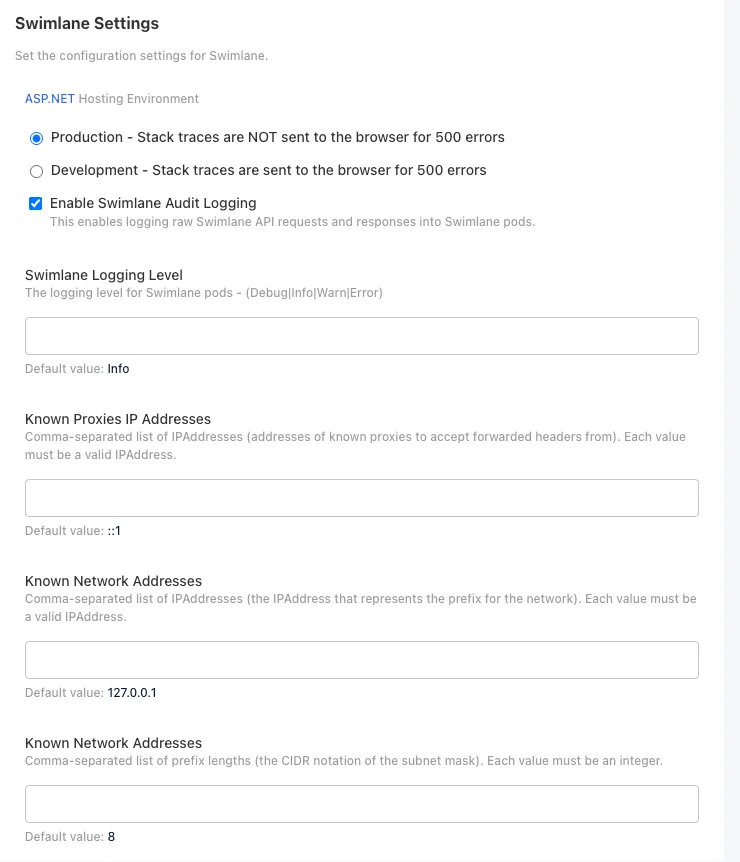
- ASP.NET Hosting Environment - Set this option to control how ASP.NET Core behaves in different environments:
- Production - Stack traces are NOT sent to the browser for 500 errors. This is the recommended setting for production deployments to prevent information disclosure.
- Development - Stack traces are sent to the browser for 500 errors. Use this setting only in development or troubleshooting scenarios, as it exposes sensitive information.
- Enable Swimlane Audit Logging - Enable this option to log raw Swimlane API requests and responses into Swimlane pods. When enabled, all API requests and their responses are logged, which is useful for security auditing, compliance, and troubleshooting. Note that enabling this option can generate significant log volume and may impact performance in high-traffic environments. Default: Enabled.
- Swimlane Logging Level - Set the logging level for Swimlane pods. Available levels are: Debug, Info, Warn, or Error. This field is only available when Swimlane Audit Logging is enabled. Default: Info.
- Known Proxies IP Addresses - Comma-separated list of IP addresses of known proxies to accept forwarded headers from. Each value must be a valid IP address. These IP addresses are trusted when processing forwarded headers (X-Forwarded-For, X-Forwarded-Proto) from load balancers or reverse proxies. This is important for security when Swimlane is deployed behind a proxy or load balancer. Default: ::1. Example: 192.168.1.1,10.0.0.1.
- Known Network Addresses - Comma-separated list of IP addresses that represent the prefix for the network. Each value must be a valid IP address. Used together with the prefix lengths field below to define trusted network ranges in CIDR notation. These networks are trusted when processing forwarded headers. Default: 127.0.0.1. Example: 10.0.0.0,192.168.0.0.
- Known Network Addresses (Prefix Lengths) - Comma-separated list of prefix lengths (the CIDR notation of the subnet mask). Each value must be an integer. Used together with the Known Network Addresses field above to define trusted network ranges. The number of entries must match the number of entries in Known Network Addresses (IP addresses). Default: 8. Example: 24,16 (corresponds to /24 and /16 subnet masks).
Configure OpenSSL Settings
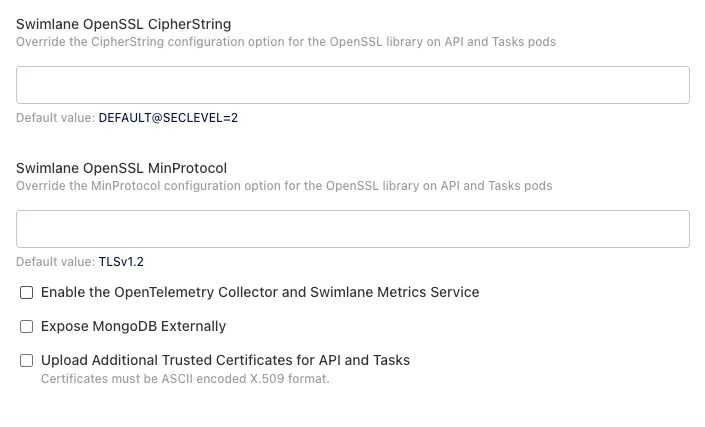
- Determine whether to override the OpenSSL settings for CipherString and MinProtocol for outgoing secure connections that originate from API and Tasks pods.
- Swimlane OpenSSL CipherString - Override the CipherString configuration option for the OpenSSL library on API and Tasks pods. Default: DEFAULT@SECLEVEL=2. You can set this to security levels like HIGH@SECLEVEL=5 or DEFAULT@SECLEVEL=5 to enforce strong encryption. Higher security levels disable weaker ciphers and protocols.
- Swimlane OpenSSL MinProtocol - Override the MinProtocol configuration option for the OpenSSL library on API and Tasks pods. Default: TLSv1.2. Valid values include TLSv1.2 and TLSv1.3. Setting a higher minimum protocol version improves security but may break compatibility with older systems.
Turbine Settings
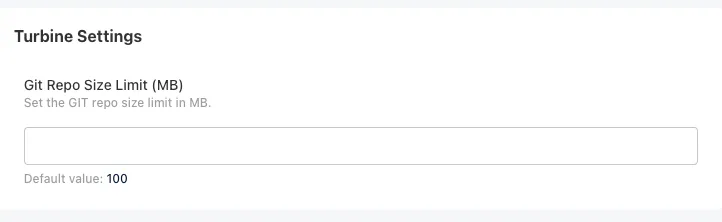
- Git Repo Size Limit (MB) - Set the Git repository size limit in MB for Turbine's content library. Default: 100. This setting controls the maximum size of Git repositories that store playbooks, connectors, and other content. Increase this value if you expect to store large amounts of content in Git repositories.
Pod Liveness Probe Settings
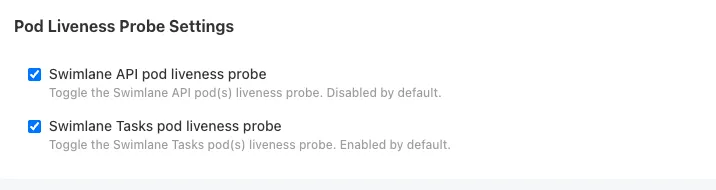
- Configure Kubernetes liveness probes for Swimlane API and Tasks pods. Liveness probes are health checks that Kubernetes uses to determine if a pod is running correctly. If a liveness probe fails, Kubernetes will restart the pod.
- Swimlane API pod liveness probe - Toggle the Swimlane API pod(s) liveness probe. Default: Enabled.
- Swimlane Tasks pod liveness probe - Toggle the Swimlane Tasks pod(s) liveness probe. Default: Enabled.
Initial MongoDB Settings
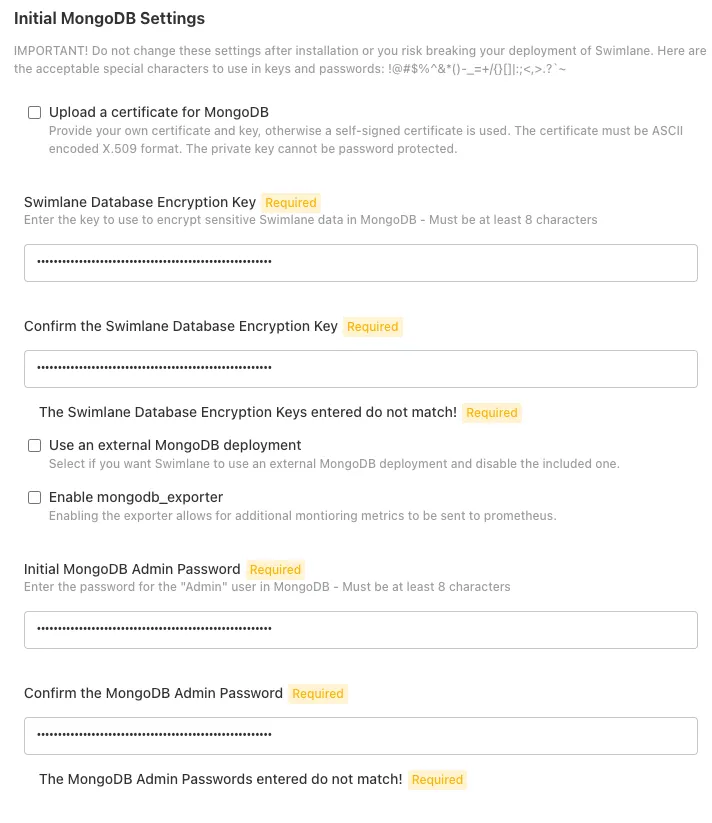
- Configure MongoDB settings for the embedded MongoDB cluster that will store Swimlane data. These settings are critical for data security and must be set during initial installation.
- Swimlane Database Encryption Key - Enter the key to use to encrypt sensitive Swimlane data in MongoDB. Must be at least 8 characters. Store this key securely, as it is required to decrypt your data.
- Confirm the Swimlane Database Encryption Key - Re-enter the encryption key to confirm it matches.
- Initial MongoDB Admin Password - Enter the password for the "Admin" user in MongoDB. Must be at least 8 characters. This password controls access to MongoDB's administrative functions. Use a strong, complex password.
- Confirm the MongoDB Admin Password - Re-enter the admin password to confirm it matches.
- Use an external MongoDB deployment - Select if you want Swimlane to use an external MongoDB deployment and disable the included one. If selected, you can skip the embedded MongoDB configuration steps.
- You can skip the embedded MongoDB configuration if you are using an External MongoDB cluster. For more information, see Deploy Swimlane with an External MongoDB Cluster.
MongoDB Certificate Requirements (CN and SAN)
If you are generating or providing your own TLS certificate for MongoDB, the certificate must include the correct Common Name (CN) and Subject Alternative Names (SANs) to allow secure communication between MongoDB replica set members and clients.
- Set the Common Name (CN) to the MongoDB service DNS name:
CN = mongo.default.svc.cluster.local- The default value in mongo.default.svc.cluster.local represents the Kubernetes namespace of the Swimlane deployment. For existing cluster installations, replace default with the namespace where the application is deployed.
- If you do not provide a custom MongoDB certificate, Turbine Platform Installer (TPI) will generate one automatically and handle certificate rotation.
- Include the following Subject Alternative Names (SANs):
DNS: mongo
DNS: mongo.default.svc.cluster.local
DNS: mongo-0.mongo.default.svc.cluster.local
DNS: mongo-1.mongo.default.svc.cluster.local
DNS: mongo-2.mongo.default.svc.cluster.local
DNS: localhost
IP:  127.0.0.1
If these values are missing, MongoDB TLS connections may fail between replica set members or when clients connect.
Configure Turbine Cloud Settings
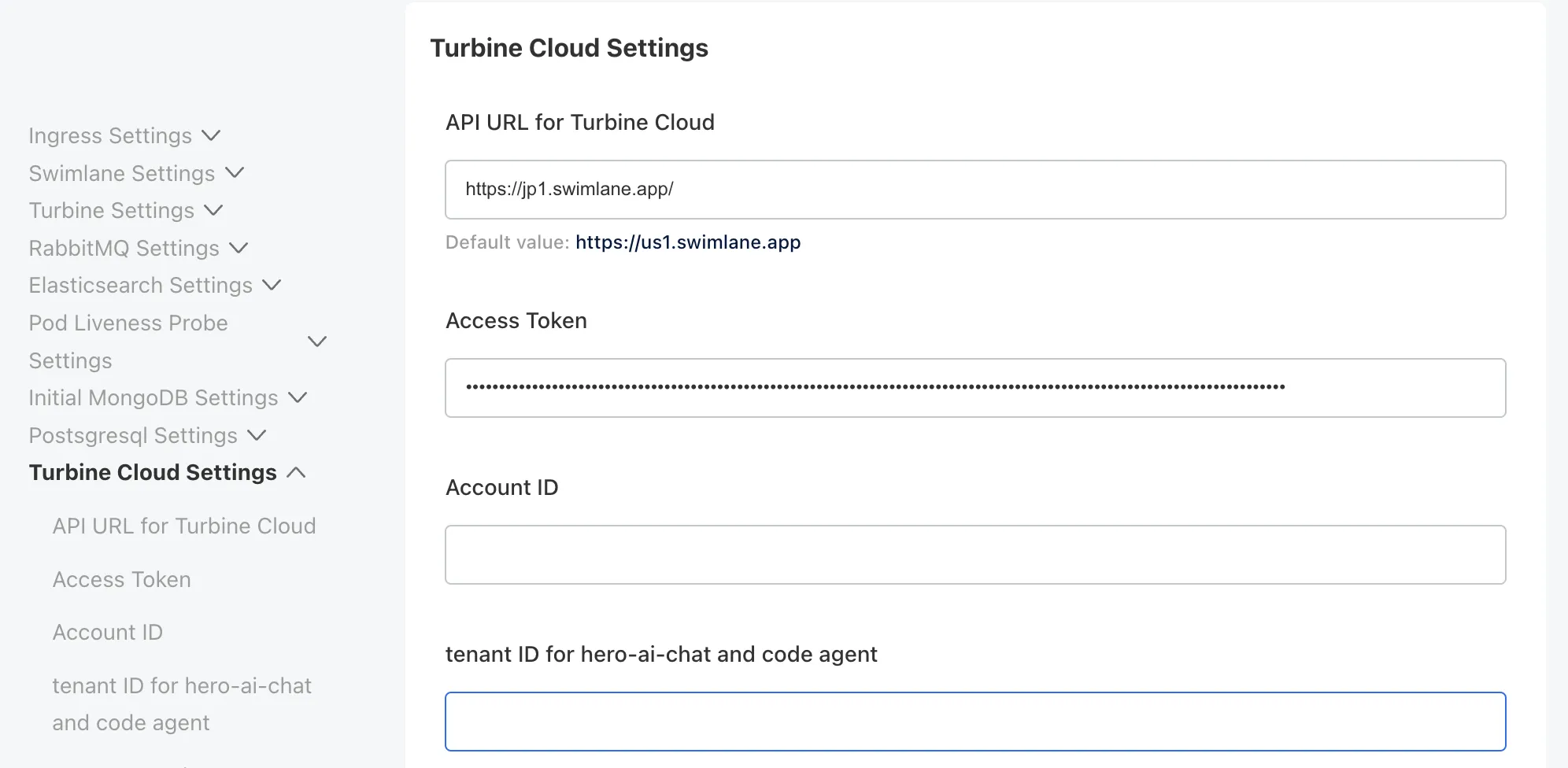
- The Turbine Cloud Settings section is used to configure the API connection between the Swimlane platform and Turbine Cloud. This configuration ensures secure and authorized access to the cloud environment. For more information, contact Swimlane support.
LLM Proxy Settings
Use LLM Proxy Settings (under Turbine Cloud Settings in the Turbine Platform Installer admin console) to control how Hero AI and related features reach language models. When you save and deploy, values are applied to the cluster llm-proxy deployment (environment variables such as LLM_PROVIDER, UPSTREAM_LLM_PROXY_URL, and when you use a custom provider, CUSTOM_LLM_* and LLM_MODEL_ID_*).
LLM Provider, custom LLM fields, and Upstream LLM Proxy URL are available in the installer exclusively for Turbine Platform 26.0.4.
LLM Provider — choose one:
Option | Purpose |
|---|---|
swimlane | Route LLM traffic through Swimlane’s upstream LLM gateway (Turbine Cloud). This is the default integration. |
custom | Route traffic to your own endpoint using LiteLLM or Amazon Bedrock (CUSTOM_LLM_BACKEND). |
When LLM Provider Is Swimlane
- Upstream LLM Proxy URL (required) — Base URL for the upstream Swimlane LLM proxy. The UI shows a pattern such as https://<region-host>/api/llm-gateway (for example https://jp1.swimlane.app/api/llm-gateway). The default value shown in the installer is https://us1.swimlane.app/api/llm-gateway; set the URL that matches your Turbine Cloud region or environment.
When LLM Provider Is Custom
- Custom LLM URL (required) — Base URL for your LiteLLM or Bedrock runtime.
- Custom LLM Backend — litellm or bedrock (select the stack that matches Custom LLM URL).
- Custom LLM API Key (required) — Credential for the custom backend; treat it as sensitive. It is stored as a Kubernetes secret material in the deployment configuration.
- LLM Medium Model ID (required) — Model identifier the proxy uses for medium-context workloads.
- LLM Medium Fallback Model ID (optional) — Fallback model when the medium model is unavailable.
- LLM Small Model ID (required) — Model identifier for small or fast workloads.
When you use a LiteLLM-compatible gateway, Swimlane recommends claude-sonnet-4.5 for LLM Medium Model ID and claude-haiku-4.5 for LLM Small Model ID, provided your backend exposes those model names. For other runtimes (including Bedrock), use the model identifiers your provider documents.
When Custom LLM Backend is bedrock and you authenticate with a Bedrock API key in Custom LLM API Key (bearer token to the Bedrock runtime), set LLM Medium Model ID, LLM Small Model ID, and LLM Medium Fallback Model ID (when used) to cross-region inference profile IDs, not foundation model IDs. Resolving a foundation model to an inference profile uses Bedrock control plane APIs that require IAM (SigV4); a Bedrock API key is only valid for the data plane, so that resolution does not run on this path.
ID type | Example | Suitable for this path |
|---|---|---|
Inference profile ID | global.anthropic.claude-sonnet-4-20250514-v1:0 | Yes |
Foundation model ID | anthropic.claude-sonnet-4-5-20251001-v1:0 | No |
The inference profile prefix (us1., de1., sg1., and so on) must match the region group of your Custom LLM URL / Bedrock endpoint. When you use IAM credentials for Custom Bedrock (for example access keys or instance roles at deployment) instead of a Bedrock API key, configuration can differ; use the guidance from your Swimlane contact. :::
When you change LLM Provider from custom to swimlane, you must clear the custom LLM fields (Custom LLM URL, Custom LLM API Key, and the model ID fields) before you save and deploy. The installer does not apply that switch unless those fields are cleared. After cleanup, set LLM Provider to swimlane, configure Upstream LLM Proxy URL as needed, then save and deploy again.
HA Settings
- Configure High Availability (HA) settings for your Turbine deployment. HA configuration is available when you have 3 or more nodes in your cluster and ensures redundancy and fault tolerance.
- HA Environment - Select if the deployment is a cluster and has multiple nodes. Default: Disabled.
- When HA Environment is enabled, set the number of replicas (pods) for each service type:
- Number of Web Replicas - The number of Web pods. Default: 3.
- Number of API Replicas - The number of API pods. Default: 3.
- Number of Tenant Replicas - The number of Tenant pods. Default: 3.
- Number of Task Replicas - The number of Task pods. Default: 3.
- Number of Reports Replicas - The number of Reports pods. Default: 3.
- Number of Record Replicas - The number of Record pods. Default: 3.
- Number of Turbine API Replicas - The number of Turbine API pods. Default: 3.
- Number of Turbine Engine Replicas - The number of Turbine Engine pods. Default: 6.
- Number of Turbine Agent Replicas - The number of Turbine Agent pods. Default: 3.
- Number of Turbine Agent Native Actions Replicas - The number of Turbine Agent Native Actions pods. Default: 3.
- Number of Turbine Agent Container Actions Replicas - The number of Turbine Agent Container Actions pods. Default: 3.
- Number of Turbine Webhook Agent Replicas - The number of Turbine Webhook Agent pods. Default: 3.
- Number of Turbine Agent Gateway Replicas - The number of Turbine Agent Gateway pods. Default: 3.
- Number of Turbine content library Replicas - The number of Turbine content library pods. Default: 3.
- Number of Turbine Record QoS Replicas - The number of Turbine Record QoS pods. Default: 3.
- Number of MongoDB Replicas - Enter the number of MongoDB pods in the replica set. Must be at least 3 and an odd number. Default: 3.
- Number of PostgreSQL Replicas - Enter the number of PostgreSQL pods in the replica set. Must be at least 3 and an odd number. Default: 3.
- Number of RabbitMQ Replicas - The number of RabbitMQ pods. Default: 3.
- Number of Elasticsearch replicas - The number of Elasticsearch replicas. Default: 3.
- Number of Swimlane Data ElasticIngestion replicas - The number of Swimlane Data ElasticIngestion replicas. Default: 3.
- Number of Swimlane Notifications replicas - The number of Swimlane Notifications replicas. Default: 3.
- Number of Swimlane securityintelligence replicas - The number of Swimlane securityintelligence replicas. Default: 3.
- Number of Swimlane fileapi replicas - The number of Swimlane fileapi replicas. Default: 3.
- Number of Swimlane file utilities replicas - The number of Swimlane file utilities replicas. Default: 3.
- Number of Swimlane Data ElasticIngestion playbook run replicas - The number of Swimlane Data ElasticIngestion playbook run replicas. Default: 3.
- Number of Swimlane Data ElasticIngestion heroai replicas - The number of Swimlane Data ElasticIngestion hero ai replicas. Default: 3.
Affinity Settings
- Configure pod affinity and anti-affinity rules to control how pods are distributed across nodes in your cluster. These settings help ensure high availability and optimal resource utilization.
- Swimlane Web / API / Tasks / Reports / Metric and Turbine API / Engine / Agent / Webhook Agent / RabbitMQ Pod AntiAffinity Settings - Select the anti-affinity setting for these services:
- Soft (Recommended) - Prefer that pods are scheduled separately from similar pods. Continue with scheduling if the affinity rule cannot be satisfied. This provides a balance between availability and resource utilization.
- Hard - Require that pods are scheduled separately from similar pods and do not schedule if the affinity rule cannot be satisfied. This provides maximum availability guarantees but may prevent scheduling if nodes are unavailable.
- None - No AntiAffinity settings. Schedule pods anywhere.
- MongoDB Pod AntiAffinity Settings - Select the anti-affinity setting for MongoDB pods:
- Soft - Prefer that MongoDB pods are scheduled on different hosts. Continue with scheduling if the affinity rule cannot be satisfied.
- Hard (Recommended) - Require that MongoDB pods are scheduled on different hosts and do not schedule if the affinity rule cannot be satisfied. This ensures that if one node fails, your MongoDB data remains available on other nodes.
- None - No AntiAffinity settings. Schedule MongoDB pods anywhere.
- RabbitMQ Pod AntiAffinity Settings - Select the anti-affinity setting for RabbitMQ pods:
- Soft - Prefer that RabbitMQ pods are scheduled on different hosts. Continue with scheduling if the affinity rule cannot be satisfied.
- Hard (Recommended) - Require that RabbitMQ pods are scheduled on different hosts and do not schedule if the affinity rule cannot be satisfied.
Default Tenant Settings
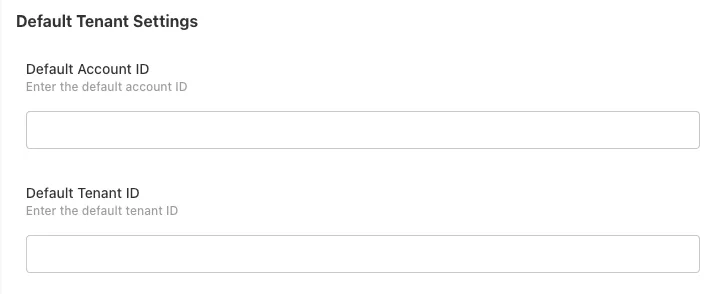
- Configure default tenant and account identifiers for multi-tenant deployments. These settings are optional and used primarily in multi-tenant environments where you need to specify default tenant and account associations.
- Default Account ID - Enter the default account ID. This is useful in multi-tenant deployments where you want to associate resources with a specific account by default. Optional.
- Default Tenant ID - Enter the default tenant ID. This helps ensure that resources are created in the correct tenant context in multi-tenant environments. Optional.
Proxy Settings
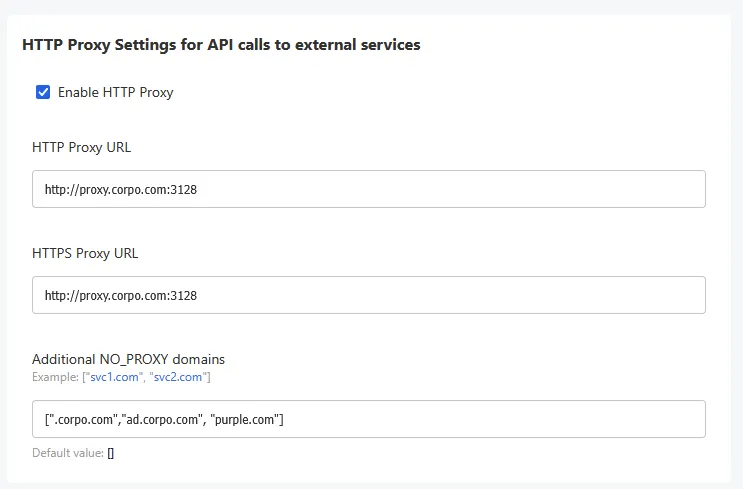
Configure outbound proxy settings for API calls to external services.
If your environment requires outbound traffic to pass through a corporate proxy, you can enable and configure proxy settings in the Admin Console.
Configure Proxy Settings
Enable and configure the following fields:
- Enable HTTP Proxy: Enables proxy configuration for outbound API calls.
- HTTP Proxy URL: The proxy server used for HTTP traffic.
- HTTPS Proxy URL: The proxy server used for HTTPS traffic.
- Additional NO_PROXY domains: A list of domains, hostnames, or IP addresses that should bypass the proxy.
Example:
- HTTP Proxy URL: http://proxy.corp.com:3128
- HTTPS Proxy URL: http://proxy.corp.com:3128
- Additional NO_PROXY domains: [".corp.com", "localhost"]
- Internal cluster service names are automatically included in the NO_PROXY list.
- User-provided NO_PROXY entries are merged with default values.
- Proxy URLs may include credentials and are stored securely as Kubernetes secrets.
Beta Configuration Settings
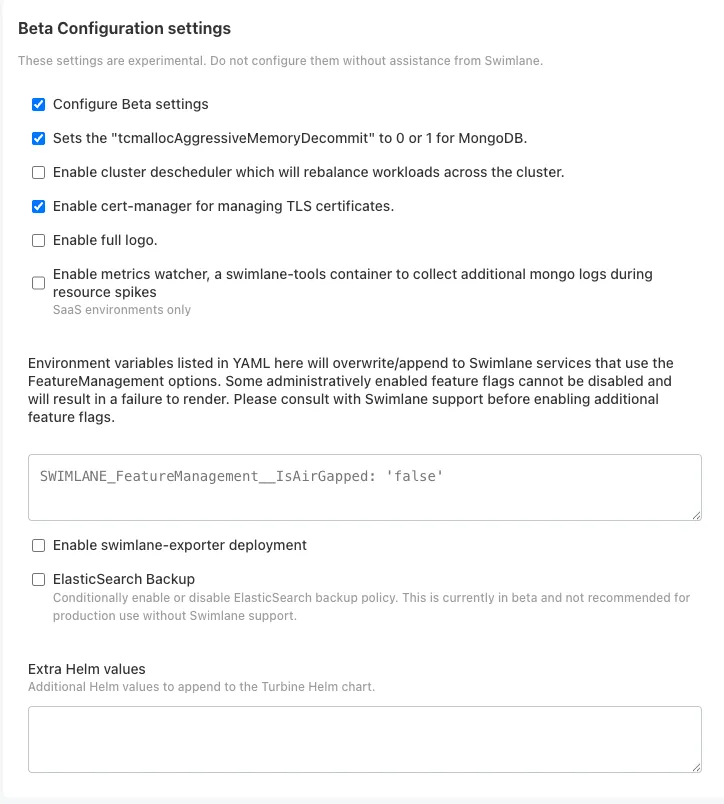
- The Beta Configuration settings section contains experimental configuration options. These settings are experimental. Do not configure them without assistance from Swimlane.
- Configure Beta settings - Enable this option to access beta configuration options. Default: Disabled.
- When enabled, additional beta settings may be available, including:
- MongoDB memory management settings
- Cluster descheduler options
- Cert-manager configuration
- Feature management options
- Additional Helm values
- Elasticsearch Enterprise (and FIPS mode)
Enable Elasticsearch Enterprise (FIPS)
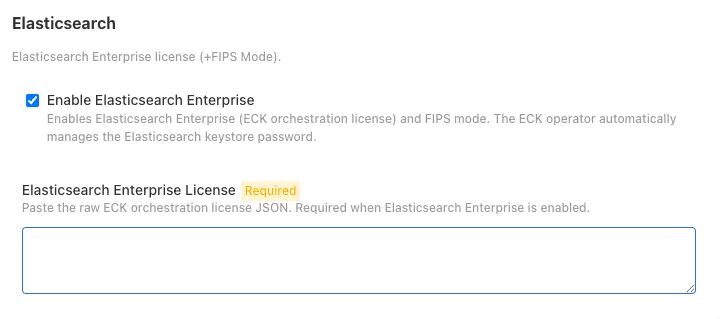
Use this option when your on-prem deployment requires an Elasticsearch Enterprise orchestration license and FIPS mode for Elasticsearch data storage. Available starting in Turbine Platform 26.3.0.
Do not enable Elasticsearch Enterprise without a valid ECK orchestration license and guidance from Swimlane. Enabling this option turns on Elasticsearch FIPS mode. Turning the option off clears the license and FIPS configuration for the next deploy.
Prerequisites
- Turbine Platform Installer (TPI) 26.3.0 or later
- A Replicated / KOTS license that includes the Elasticsearch Enterprise entitlement (contact Swimlane if you are unsure)
- The raw ECK orchestration license JSON provided for your deployment
Procedure
- In the Turbine Platform Installer Admin Console, open Beta Configuration settings.
- Select Configure Beta settings.
- Under Elasticsearch, select Enable Elasticsearch Enterprise.
- In Elasticsearch Enterprise License, paste the raw ECK orchestration license JSON.
- Save and deploy the configuration.
When Enable Elasticsearch Enterprise is selected:
- Turbine applies the ECK orchestration license to the cluster.
- Elasticsearch FIPS mode is enabled.
- The ECK operator manages the Elasticsearch FIPS keystore password automatically. You do not set a keystore password or mount a keystore-password secret.
Scope: FIPS mode applies to Elasticsearch in this configuration. The Turbine Kibana image used by TPI is not a FIPS-enabled Node.js runtime, so Kibana FIPS mode is not enabled.
MongoDB Enterprise (existing): To use MongoDB Enterprise, enable Enable MongoDB Enterprise under the MongoDB settings in the Admin Console. Your KOTS license must include the MongoDB Enterprise entitlement. That option is separate from Elasticsearch Enterprise.
Preflight and Deployment
- Once the preflight checks process, the Turbine Platform Installer Admin Console opens.
Once the status of your application says Ready, you have a successful installation of Turbine.