How to securely authenticate to platform APIs from playbooks using a personal access token
Purpose
This article describes how to call Tenant, Swimlane, and Turbine APIs from playbooks using a personal access token (PAT) without storing credentials in playbook configuration. Use it when playbook automation needs authenticated HTTP access to the platform.
Core rule: send PAT as Private-Token, not Bearer
Turbine PATs must be sent as:
Private-Token: <YOUR_PAT>The HTTP Request action’s Bearer Token option sends Authorization: Bearer <token>. For Turbine platform APIs, that path validates a login JWT, not a PAT. A PAT in Bearer auth usually returns 401 with "Token validation failed".
Setup | Secure? | Works with Turbine PAT? |
|---|---|---|
PAT in an asset (HTTP API Key header Private-Token, or Swimlane Turbine API connector PAT) | Yes — recommended | Yes |
HTTP Request Bearer Token | No | No |
PAT in playbook Authentication, Headers, or inputs | No — exposes secrets in config, exports, and runs | Do not use |
Step 1: Create a personal access token
- Sign in to Turbine.
- Open Profile & user settings.
- Open Personal Access Token.
- Click Generate Token.
- Copy the token immediately; it will not be shown again.
Security practices:
- Use a service account with the minimum roles required.
- Rotate the PAT by updating the asset only, not playbook steps.
- Never share PATs in tickets, chat, or source control.
Knowledge Center: Creating a Personal Access Token
Recommended approach 1: HTTP Request native action + asset
Use this when you need the full URL (Tenant API, Swimlane API, Turbine API, or other paths).
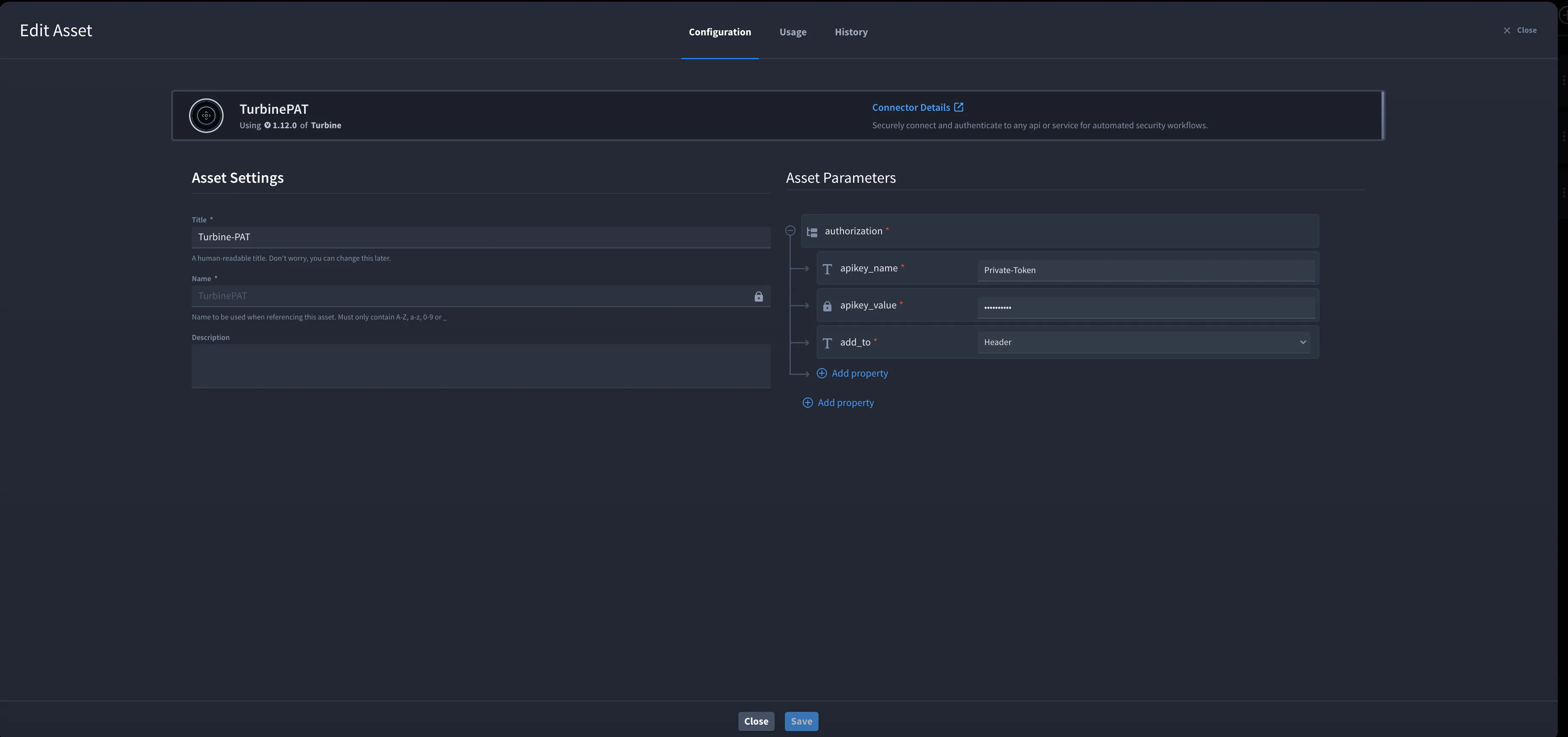
1. Create the PAT asset
- Go to ORCHESTRATION → Assets.
- Create an asset using API Key authentication (same pattern as the HTTP connector):
- API Key Name: Private-Token
- API Key Value: service account PAT
- API Key Location: Header
- Save the asset.
Knowledge Center: Assets
2. Attach the asset on the HTTP Request action
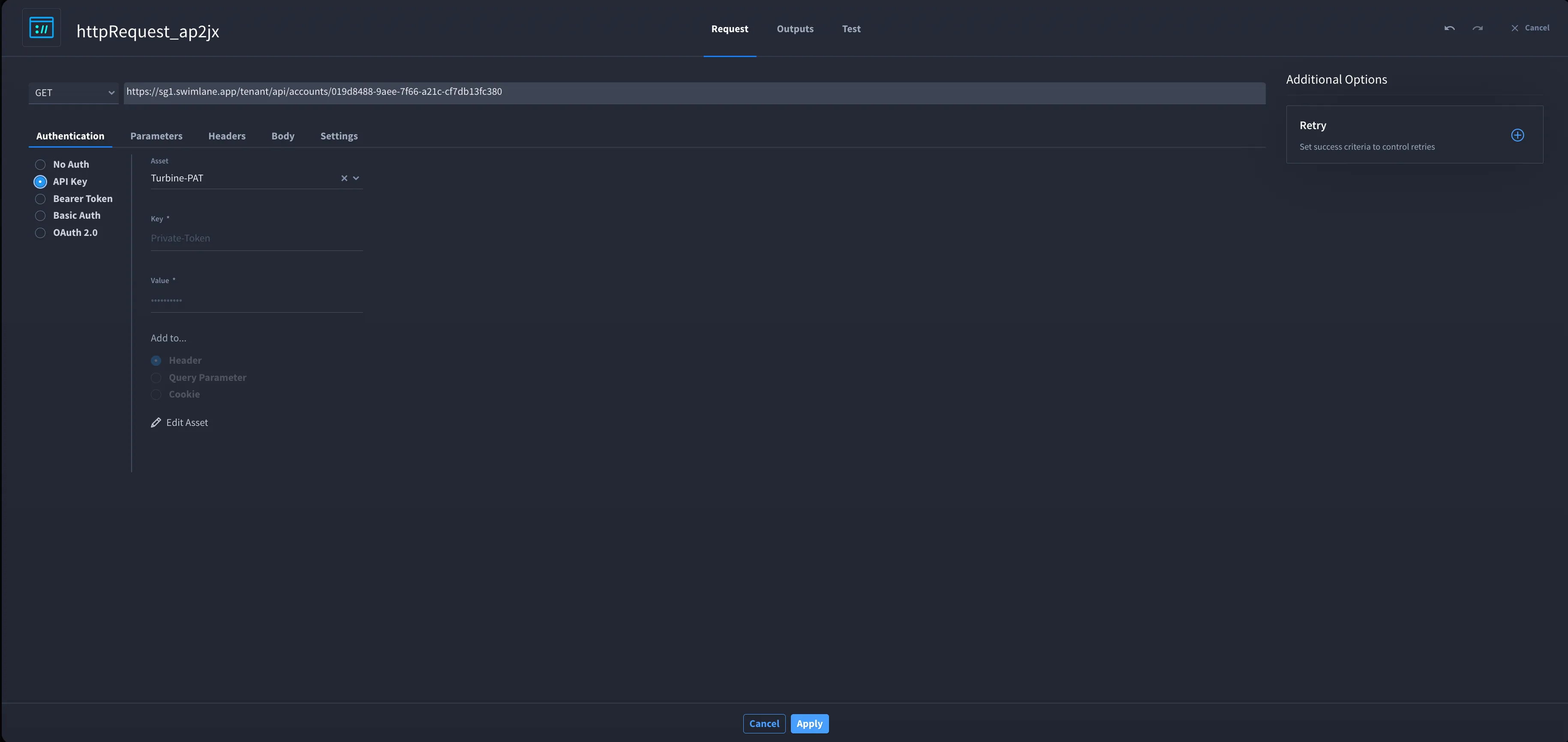
- Add an HTTP Request native action.
- Set method and full endpoint URL.
- Select the PAT asset in the action Asset field.
- Do not store the PAT in Authentication, Headers, or playbook inputs.
Knowledge Center: Using the HTTP Request Native Action
3. Optional: verify with a GET
Example read-only check:
- GET https://<host>/tenant/api/accounts/<ACCOUNT_ID>/users/light
- Optional query: size = 20, pageNumber = 1 (integers only)
- Expect HTTP 200 when the asset and path are correct.
Recommended approach 2: Swimlane Turbine API connector + PAT asset
Use this for Turbine orchestration API calls through the supported connector instead of hand-building every HTTP Request.
1. Configure the connector asset
- Go to ORCHESTRATION → Assets.
- Create a Swimlane Turbine API asset.
- Configure PAT authentication (instance URL + PAT). Prefer PAT over username/password in the asset when possible.
- Save the asset.
Knowledge Center: Swimlane Turbine API connector — Configurations (Turbine API Authentication and PAT Authentication)
2. Run Generic Turbine API Request
- Add the Generic Turbine API Request action from the Swimlane Turbine API connector.
- Select the PAT asset.
- Set host (for example sg1.swimlane.app), path, and method per the connector documentation.
Knowledge Center: Generic Turbine API Request (inputs: host, path, method)
Need | Use |
|---|---|
Tenant API (/tenant/api/...), Swimlane API, arbitrary URLs | Approach 1 — HTTP Request + PAT asset |
Turbine orchestration API via the connector | Approach 2 — Swimlane Turbine API connector + PAT asset |
API path patterns
API surface | Path pattern |
|---|---|
Tenant API | https://<host>/tenant/api/accounts/{accountId}/... |
Swimlane API | https://<host>/api/account/{accountId}/tenant/{tenantId}/... |
Turbine API | https://<host>/orchestration/api/account/{accountId}/tenant/{tenantId}/v1/... |
Common mistakes: singular /tenant/api/account/... (404); missing Private-Token (401); PAT sent as Bearer (401).
Knowledge Center: Audit Logging (example curl with Private-Token)
Approaches to avoid (credential exposure)
Do not use these patterns, even if they appear to work:
- Entering the PAT on the HTTP Request Authentication tab without an asset.
- Literal Private-Token in the Headers tab.
- PAT in playbook properties, variables, or action inputs.
- Username and password typed on actions instead of a secured asset.
- Bearer Token on HTTP Request for a Turbine PAT.
If a PAT was stored in a playbook, rotate the PAT and move credentials to an asset.
Troubleshooting
Symptom | Likely cause | What to do |
|---|---|---|
401 "Token validation failed" | PAT sent as Bearer | Use PAT asset; Private-Token header |
401 (other) | Invalid or revoked PAT | Regenerate PAT; update asset |
403 | Insufficient roles | Adjust service account |
404 | Wrong URL | Use accounts (plural); verify host |
400 on size / pageNumber | Non-integer query values | Use numbers or omit params |
Token in export or run | PAT not in asset | Move to asset; rotate PAT |
Security checklist
- Service account PAT with least privilege
- PAT stored only in assets (HTTP API Key or Swimlane Turbine API connector)
- No literal tokens in HTTP Request fields
- SSL verification enabled in production
- PAT rotated after exposure or personnel change
Related documentation (Knowledge Center)
Topic | Link |
|---|---|
Create PAT | |
HTTP Request native action | |
Assets | Assets |
API Key asset pattern | |
Swimlane Turbine API connector (PAT + Generic Request) | |
Private-Token curl example |