Resizing the MongoDB PVC on eks existing clusters using gp2 as the MongoDB volume storageclass
On Existing clusters, the customer is responsible for the EKS configuration. While using gp2 as the MongoDB volume storageclass (rather than openebs we use for embedded clusters), we must resize the volumes in EKS. So customers with the same existing cluster configuration can follow the following steps:
Prerequisites
- Ensure permissions to edit volumes and Persistent Volume Claims (PVCs) within your EKS environment.
- Confirm the ability to access the Kots admin console and AWS console.
- From Kots admin console update Kots config and redeploy Kots version with resized db
- Log in to the Kots admin console.
- Navigate to the Settings or Configuration section.
- Update the MongoDB volume size field to the new desired size under the database configuration.
- Redeploy the Kots version to apply the updated configuration.
- Note: Ensure that the updated size is reflected in the configuration to avoid discrepancies when Kubernetes applies the volume size.
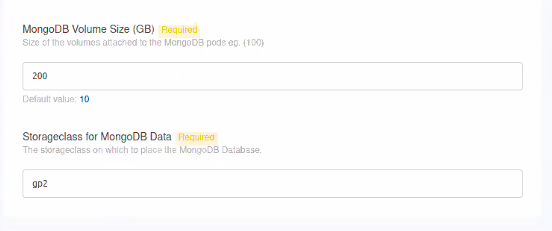
- From common cluster update volume size in persistent volume configs
- Resize volume in aws console (gp2 Storage Class)
These steps provide a thorough approach for resizing MongoDB volumes using gp2 in a cluster on EKS