How To Reinitialize PostgreSQL (Swimlane)
Problem: The PostgreSQL deployment is broken, causing application pods like swimlane-tasks and swimlane-api to crash.
Solution: Reintialize the PostgreSQL cluster.
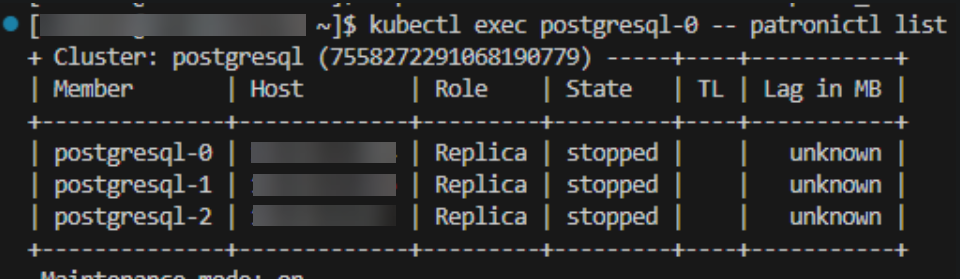
- The PostgreSQL cluster is in an unhealthy state, similar to the indication below:
$ kubectl exec -it postgresql-0 -- patronictl list
- Completely remove the broken Kubernetes postgresql custom resource definition. This step may take up to 10 minutes to fully complete depending on the cluster state:
$ kubectl get postgresql postgresql
NAME TEAM VERSION PODS VOLUME CPU-REQUEST MEMORY-REQUEST AGE STATUS
postgresql swimlane 14 1 8Gi 16m Running
$ kubectl delete postgresql postgresql
postgresql.acid.zalan.do "postgresql" deleted
$ kubectl delete endpoints postgresql-config
$ kubectl delete svc postgresql-config
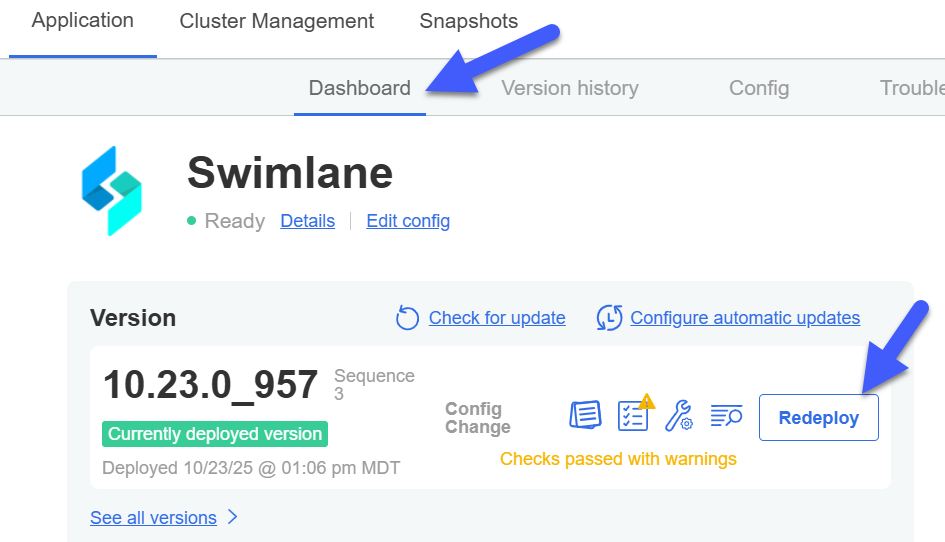
- Reapply the KOTS deployment by clicking on the "Redeploy" button in the Admin Console:
- Restart all Swimlane application pods:
$ kubectl delete pod -l app.kubernetes.io/name=swimlane
pod "gotenberg-6df9b986b8-vv6sr" deleted
pod "swimlane-api-564ff576bd-qckxc" deleted
pod "swimlane-reports-584bb577bf-ps9hn" deleted
pod "swimlane-tasks-9fcd9bfc7-5jbsd" deleted
pod "swimlane-tools-0" deleted
pod "swimlane-web-786866b48d-lfcql" deleted
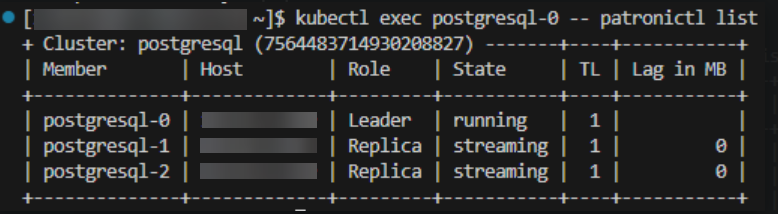
- Now the PostgreSQL cluster should be healthy: