How to Create a Playbook
Playbook and component runs use platform timeout defaults (4 hours total from start, extended by up to 1 hour per period of job activity). Individual connector and native actions time out after 15 minutes. See Timeouts and Limits for details.
Playbook action input and outputs are limited to 20MiB. You should always narrow data down as much as possible for playbook and action performance.
How to Create a Playbook
Use this topic to create a playbook on the canvas by dragging triggers and actions. For natural-language creation and changes, see Create and Modify Playbooks with Hero AICreate and Modify Playbooks with Hero AI. For playbooks, the canvas, and the data model, see Playbooks OverviewPlaybooks Overview.
Choose Your Path
I want to… | Go to |
|---|---|
Create a playbook manually on the canvas | |
Build or change flows with Hero AI (Text to Playbook) | Create and Modify Playbooks with Hero AICreate and Modify Playbooks with Hero AI |
See what the Playbook Generator Agent can do | Playbook Generator Agent ReferencePlaybook Generator Agent Reference |
Enable, publish, or submit a playbook | Enable and Disable PlaybooksEnable and Disable Playbooks, Publish PlaybooksPublish Playbooks, or Submit to SwimlaneSubmit to Swimlane |
Organise actions and flows on the canvas | Organizing Playbook in the CanvasOrganising Playbook in the Canvas |
Review action count, timeout, and structural limits | |
Configure triggers | TriggersTriggers |
Add connectors, components, or AI agents to a playbook | Install Connectors, Components, and AI Agents to a PlaybookInstall Connectors, Components, and AI Agents to a Playbook |
Create a New Playbook Manually
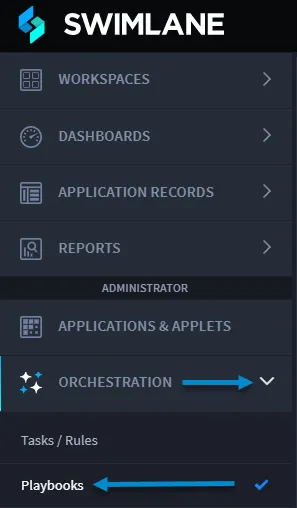
- From the navigation menu, click ORCHESTRATION.
- Click Playbooks.
- From the Playbooks home page task bar, click the plus menu icon, and then select Create a new playbook.
- In New Playbook window, enter a Name for the playbook and (optionally) a description, and then click Save.
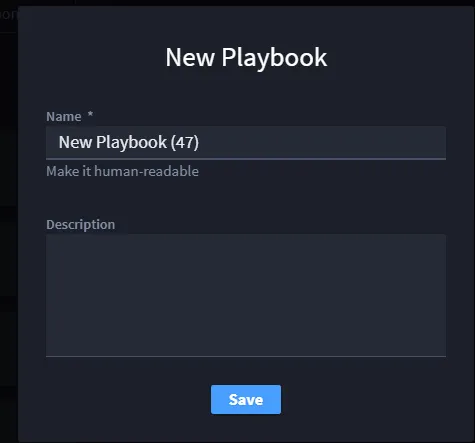
The playbook opens.
- Add a Triggerstrigger and actions from the Add panel. For canvas layout, see Organizing Playbook in the CanvasOrganising Playbook in the Canvas.
- Install Connectors, Components, and AI Agents to a PlaybookInstall Connectors, Components, and AI Agents to a Playbook
- Connect actions to define the flow.
- Enable the playbook when you are ready to run it.
- Configure action inputs and outputs as needed in the action configuration panel.
- Test the playbook from the canvas using the Test Console.
If you want to import Swimlane Solution Package files (.ssp files), see Import Swimlane Solution Packages.
Trigger Types
Trigger type | Topic |
|---|---|
Flow event | Flow Event TriggerFlow Event Trigger |
Playbook button | Playbook Button TriggersPlaybook Button Triggers |
Record event | Record Event TriggersRecord Event Triggers |
Schedule | Schedule TriggersSchedule Triggers |
Webhook | Using Webhook Triggers in Swimlane TurbineUsing Webhook Triggers in Swimlane Turbine |
Enabled Playbook Toggle
To view details about how to enable or disable a playbook, see Enable and Disable PlaybooksEnable and Disable Playbooks.
Publish and Manage Playbooks
- Publish PlaybooksPublish Playbooks
- Submit to SwimlaneSubmit to Swimlane
See Also
- Create and Modify Playbooks with Hero AICreate and Modify Playbooks with Hero AI
- Playbooks OverviewPlaybooks Overview
- Organizing Playbook in the CanvasOrganising Playbook in the Canvas