Discovered Outputs and Testing
For every action, there are outputs. When an action executes (and does not fail), the output data returns a minimum base of property types, which you can apply as inputs for other actions within your playbook, or promote for use outside of the current playbook through the Playbook Outputs dialog.
Discovered Outputs
In addition to the base property types, action outputs may return additional properties based on the action or connector you use and the inputs you provide. These are the discovered outputs.
Test Actions
Testing a single action enables better debugging, helps you detect errors earlier, saves time, and lets you test inputs while building your playbook.
Test an Action
To test connectors/actions:
- Select your action and click Configure. The Inputs, Outputs, and Test tabs are available to configure.
- Click the Test tab.
- Enter your test inputs and configure the rest of the action as needed.
- Click Test to run the action test.
The Result pane below provides the raw JSON data. Turbine converts that difficult-to-read JSON into an easy-to-read format under the Discovered Outputs tab. The discovered outputs are combined with the base (original) outputs. All of the known outputs display with check marks. The remaining outputs from the request are unchecked, and you can select one or all of them and click Add those selected to outputs.
To view the added outputs, navigate to the Outputs tab. All of the outputs that were custom (that you just added) display with the option to delete. You cannot delete any outputs that are part of the original outputs.
Error Outputs
If your action fails, you need to know more information about why the action failed. Turbine provides a base-level Error property type for action outputs. The Error property type gives you access to any output properties when an error occurs.
Currently, the HTTP native action, Script native action, and connectors have this property type. This provides a better user experience when testing actions and handling errors.
Use Error Outputs
Example:
Alex has a playbook with two HTTP native actions connected in sequence. The first HTTP action makes a POST request to an API endpoint. The second HTTP action uses the response from the first action.
In the first HTTP action, Alex selects the POST method and enters https://api.example.com/users as the URL.
When Alex tests this action, it fails because the API endpoint requires authentication. From the Outputs tab, Alex sees the base-level property type: Error.
Alex can reference the error outputs in subsequent actions using expressions:
Alex configures the second HTTP action to use the error output from the first action. Alex opens the action inputs and uses the property selector to reference the error properties from the first HTTP action.
Now, if the first HTTP action fails, the error response is available for use in the second HTTP action or other downstream actions in the playbook.
Discover Error Outputs
You can discover outputs during action testing. Actions have outputs based on what action or connector you choose and the base property types that are returned.
If the action test has an error response, you can discover error outputs.
Example:
Alex selected the HTTP native action and configured it as below:
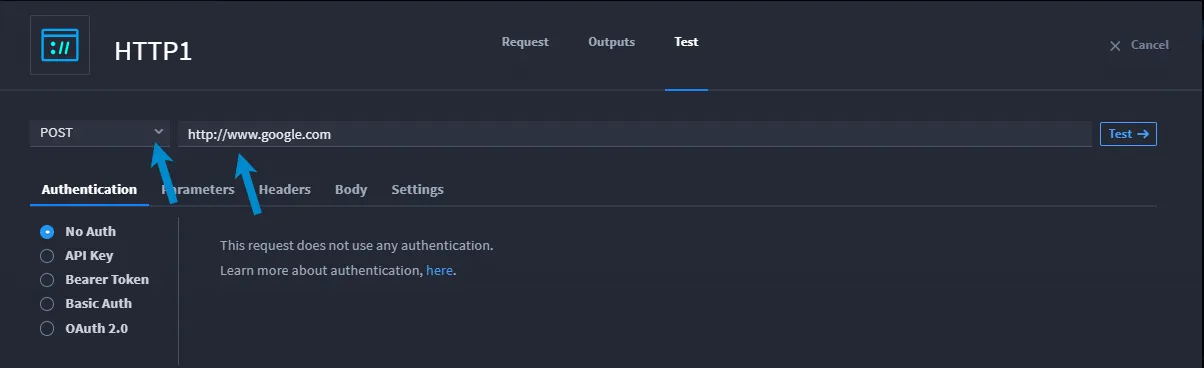
Alex clicks Test. There's an error response! It's easy to see because the Results pane now shows Error. The Result and Discovered Outputs tabs on that pane are now Error and Error Outputs.
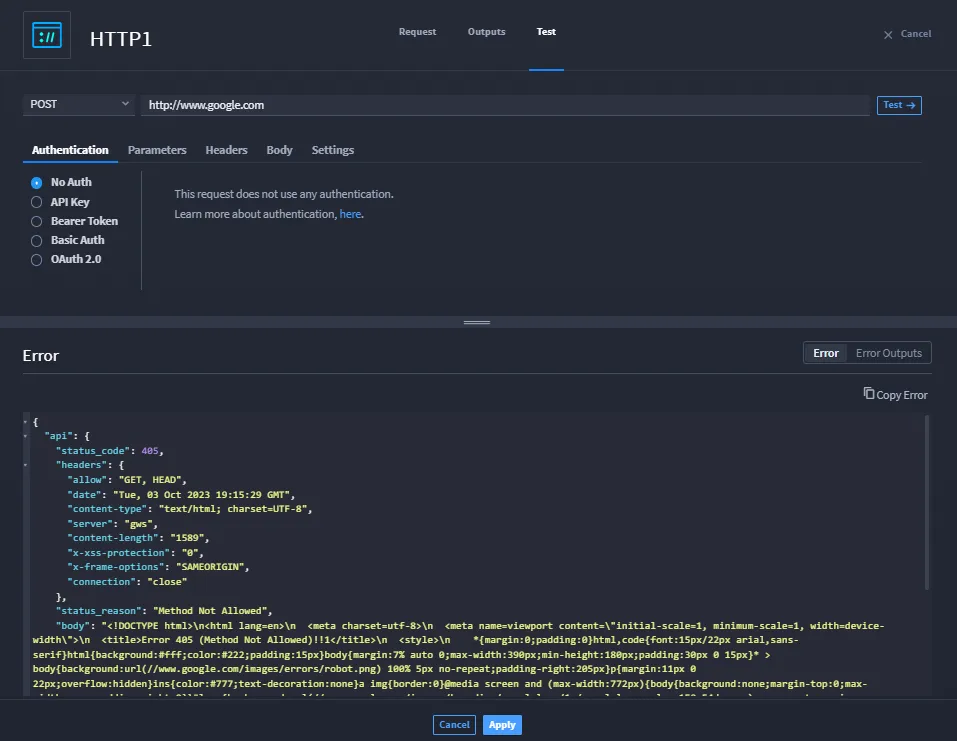
Alex wants to add the discovered Error Outputs results to the action outputs. She clicks the Error Outputs tab and selects individual properties to add, or she clicks Select All at the top of the pane to add all of the discovered error outputs to the action outputs. Once she does, she can go back to the tabs at the top of the HTTP1 action and click the Outputs tab. Miranda's selected error output properties are available under the Error property.
To promote error outputs for use outside the playbook, use the Playbook Outputs dialog. For more information, see OutputsOutputs.