FireEye Detection On Demand
Introduction
This guide tells you how to authenticate the FireEye Detection On Demand connector in Swimlane using API Key Authentication.
Prerequisites
FireEye Access Requirements
You must have permissions to:
- Access the FireEye Detection On Demand portal
- Generate or manage API authentication keys
- Access FireEye Detection On Demand API services
- Submit and retrieve malware analysis reports
Required Credentials
During setup, you will collect:
Credential | Description |
|---|---|
URL | FireEye Detection On Demand API endpoint |
FireEye Auth Key | API authentication key used to authenticate API requests |
FireEye Detection On Demand Setup
Take the following steps to obtain the API Authentication Key:
- Log in to your FireEye Detection On Demand portal.
- Navigate to the API Access or User Settings section.
- Locate the option to generate or manage API keys.
- Click Generate API Key or Create New Key.
- Provide a name or description for the API key if prompted.
- Copy and securely save the generated API key.
This saved value is your FireEye Auth Key.
Collect the Required URL
Use the FireEye Detection On Demand API base URL provided by your FireEye deployment.
Example:
Environment | Example URL |
|---|---|
FireEye Detection On Demand API |
Confirm the correct API URL with your FireEye administrator or FireEye documentation.
Connector Configuration in Swimlane
- Log in to Turbine.
- From the left-hand navigation pane, click ORCHESTRATION and click Assets.
- Asset homepage opens.
- Click the plus icon to open the Configure your Connector Asset window.
- Select FireEye Detection On Demand from the Asset type list.
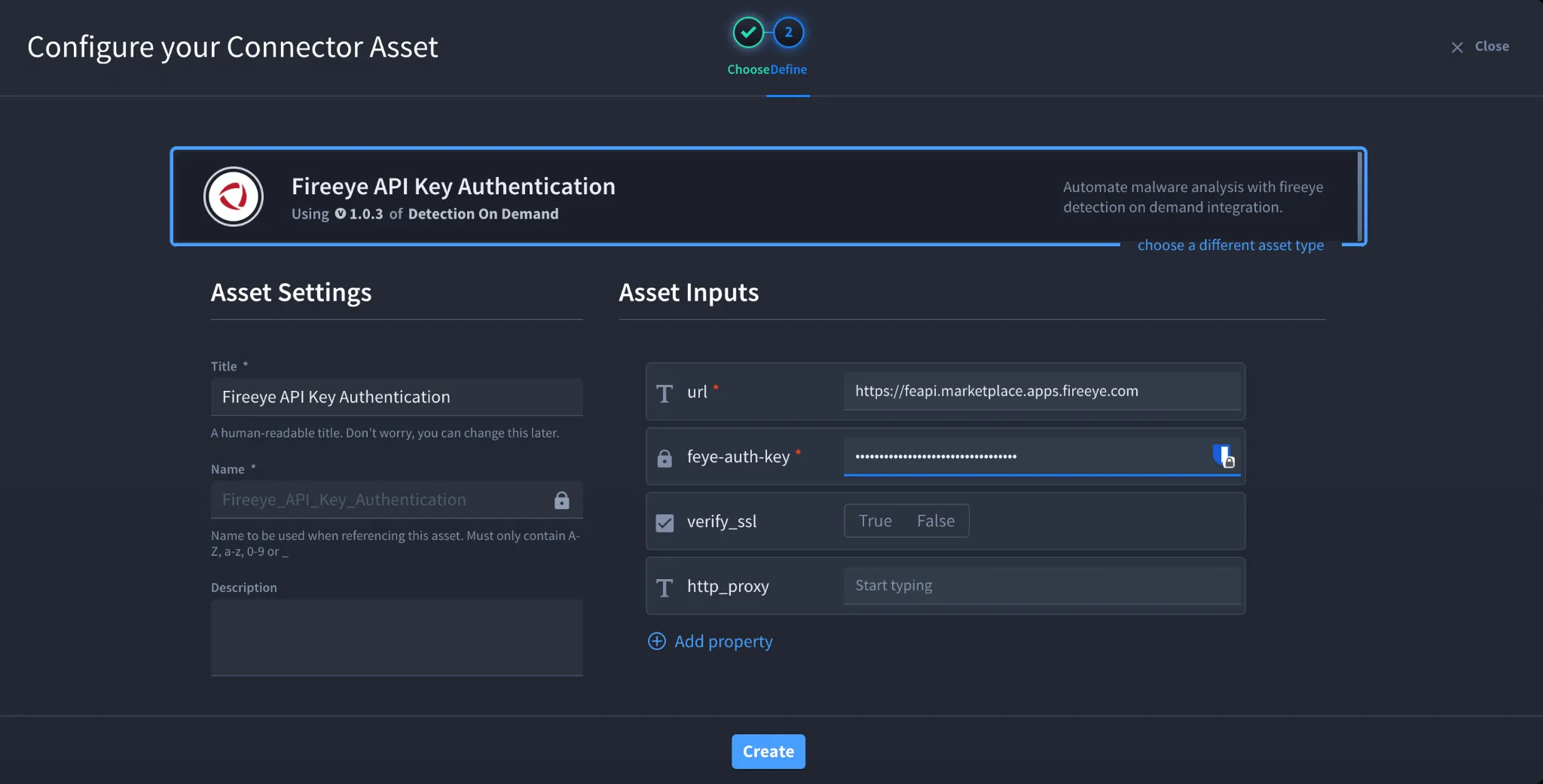
- Fill in the Asset Settings and Asset Input as shown:
Field | Description | Required/Optional |
|---|---|---|
url | FireEye Detection On Demand API URL | Required |
feye-auth-key | FireEye API Authentication Key | Required |
verify_ssl | Enable/Disable SSL Verification | Optional |
http_proxy | Optional proxy configuration | Optional |
Fields with * marks are required.
- Create Click.
Supported Authentication Method
Authentication Type | Supported |
|---|---|
API Key Authentication | Yes |
OAuth 2.0 | No |
Username/Password | No |
Troubleshooting
If authentication fails,
Verify:
- The API key is valid
- The FireEye URL is correct
- The API key has not expired
- There are no extra spaces in the API key field
SSL Verification Errors
If SSL verification fails:
- Verify the SSL certificate chain
- Confirm firewall or proxy inspection settings
- Temporarily disable verify_ssl for testing if allowed by your organization
Unable to Submit Files
Ensure:
- The uploaded file size is below 20 MB
- The API key has malware analysis permissions
- The FireEye service is reachable from Swimlane
Result
You have successfully authenticated the FireEye Detection On Demand connector in Swimlane.
Sources
- FireEye Detection On Demand API Documentation: https://www.fireeye.com/services/freeware/detection-on-demand.html
- FireEye Developer Documentation: https://fireeye.dev