Exabeam AA V2
Introduction
This guide explains how to authenticate the Exabeam AA V2 connector in Swimlane using OAuth 2.0 Client Credentials.
Prerequisites
Exabeam Access Requirements
You must have permissions to:
- Access the Exabeam Advanced Analytics console
- Generate and manage API credentials
- Access Exabeam API services
- View and manage correlation rules
- Perform event searches through the API
Required Credentials
During setup, you will collect:
Credential | Description |
|---|---|
URL | Exabeam API endpoint URL |
Client ID | Exabeam API Key |
Client Secret | Exabeam API Key Secret |
Verify SSL | Optional SSL verification setting |
HTTP Proxy | Optional proxy configuration |
Exabeam Setup
Take the following steps to generate API credentials:
- Log in to the Exabeam console.
- Navigate to: Settings → API Access or Administration → API Keys
- Click Create API Key.
- Enter:
- API Key Name
- Description (optional)
- Required permissions/scopes
- Click Generate.
- Copy and securely save:
- API Key
- API Key Secret
The API Key will be used as the Client ID in Swimlane.
The API Key Secret will be used as the Client Secret in Swimlane.
Take the following steps to identify the API URL:
The Exabeam API URL is typically in the following format:
https://<your-exabeam-instance>
Example:
https://example.exabeam.cloud
Copy and save the URL for Swimlane configuration.
Connector Configuration in Swimlane
- Log in to Turbine.
- From the left-hand navigation pane, click ORCHESTRATION and click Assets. Asset homepage opens.
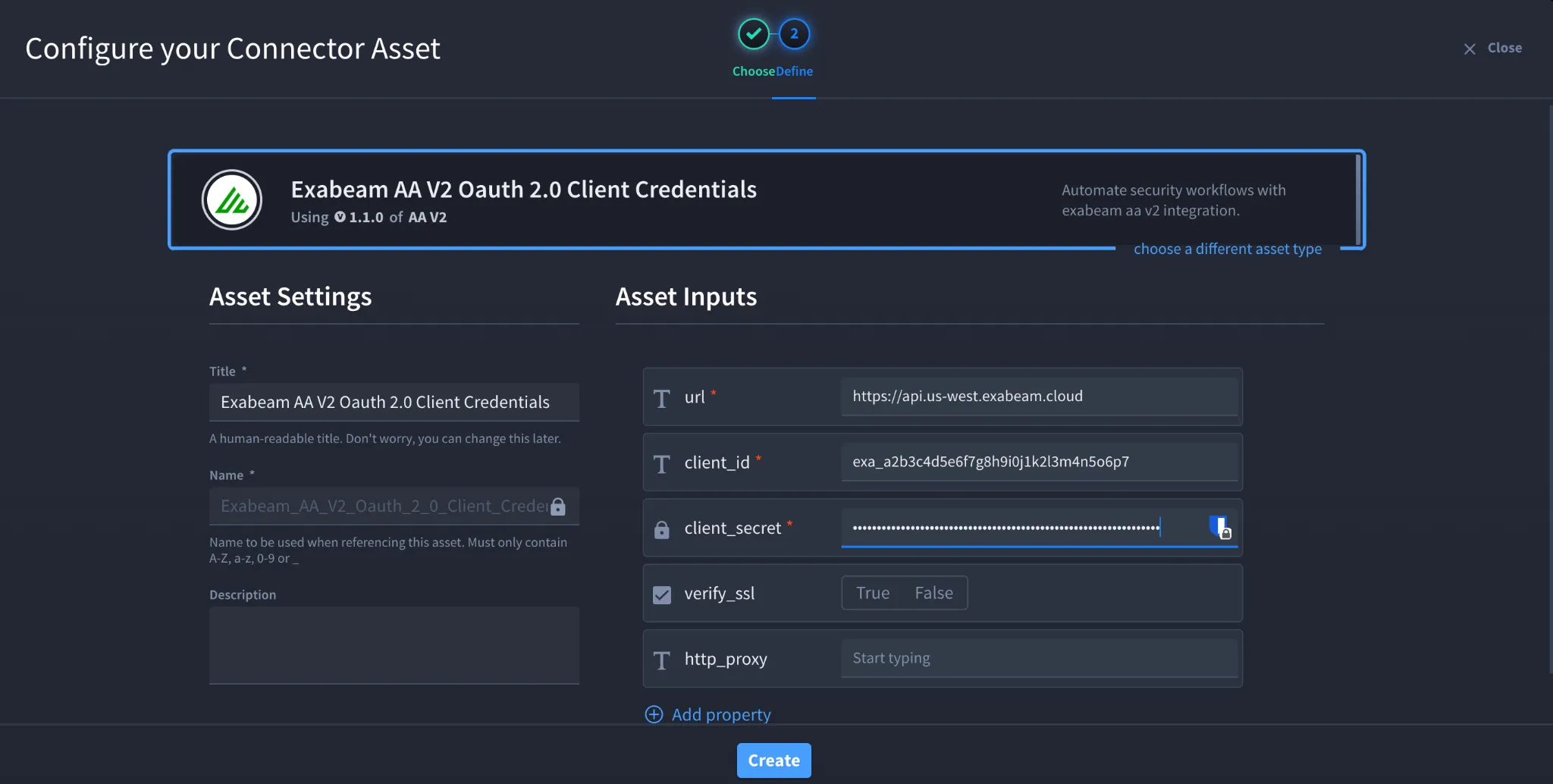
- Click the plus icon to open the Configure your Connector Asset window.
- Select Exabeam AA V2 from the Asset type list.
- Fill in the Asset Settings and Asset Input as shown:
Field | Description | Required/Optional |
|---|---|---|
url | Exabeam API URL | Required |
client_id | Exabeam API Key | Required |
client_secret | Exabeam API Key Secret | Required |
verify_ssl | Enable/Disable SSL Verification | Optional |
http_proxy | Optional proxy configuration | Optional |
Fields with * marks are required.
- Click Create.
Troubleshooting
Authentication Failed
Verify:
- Client ID is correct
- Client Secret is correct
- API credentials are active
- API URL is reachable
- User/API account has proper permissions
SSL Errors
If SSL verification fails:
- Verify the certificate chain
- Confirm proxy/firewall inspection settings
- Temporarily disable verify_ssl for testing if allowed by your organization
API Permission Errors
Ensure the API Key has permissions to:
- Read events
- Create/update/delete correlation rules
- Access Exabeam APIs
You have successfully authenticated the Exabeam AA V2 connector in Swimlane.
Sources
- Exabeam AA V2 Connector Documentation: https://docs.swimlane.com/connectors/exabeam-aa-v2
- Exabeam AA Bi-directional API Documentation: https://docs.exabeam.com/